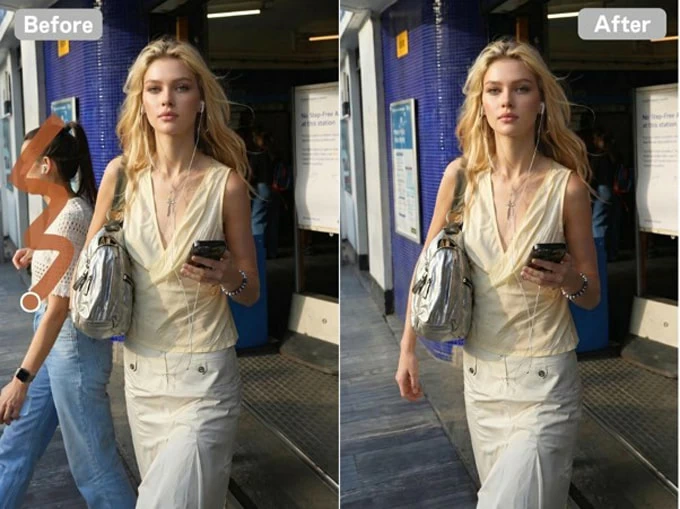
5 Best AI Tools to Remove Person from Photo (2026 guide)

Martin Tord Updated on Jul 9, 2026 10:38 AM
You don't always notice an unwanted person until after you've taken the shot. It could be a tourist walking through your vacation photo, someone standing behind your product image, or a stranger distracting from an otherwise great portrait. Cropping isn't always an option, and traditional photo editing tools often take more time than the edit is worth.
Fortunately, AI has made photo cleanup much easier. Today's best editors can remove people from an image in seconds while rebuilding the background with surprisingly natural results. The challenge isn't finding an app that offers the feature—it's finding one that produces edits you won't immediately notice.
Here are five of the best AI tools to remove person from photo in 2026, along with where each one performs best.
1. BeautyPlus
Platform: iOS, Android, Web
BeautyPlus has grown far beyond its original beauty-editing roots. Its AI People Remover is now one of the easiest ways to clean up everyday photos without requiring any editing experience.
The workflow is straightforward. Upload your image, brush over the unwanted person, and let the AI recreate the missing background. In outdoor scenes with skies, grass, beaches, or sidewalks, the reconstruction is usually clean enough that little or no additional editing is required.
Besides its dedicated remove person from photo tool, BeautyPlus also offers useful enhancement features such as ai unblur image, which can sharpen slightly soft photos before you begin removing distractions. Having both tools in the same workflow makes it convenient for quick image touch-ups.
Best for: Travel photos, family pictures, social media posts, and casual photography.
Pros:
- Beginner-friendly interface
- Fast AI processing
- Natural background reconstruction in common scenes
- Includes several additional AI enhancement tools
Cons:
- Intricate backgrounds may occasionally need a second pass
- Some advanced AI features require a premium plan
2. Adobe
Platform: Web
Adobe Firefly approaches person removal differently from many mobile apps. Instead of simply erasing an area, it uses generative AI to rebuild missing content based on the surrounding image.
That extra intelligence becomes especially noticeable when removing people from architectural photos, landscapes, or detailed urban scenes. Rather than leaving blurry patches behind, Firefly often generates textures that blend naturally into the original composition.
Its browser-based interface is clean, although users already familiar with Adobe's ecosystem will likely get the most from it.
Best for: Professional editing, architectural photography, and high-resolution images.
Pros:
- Excellent AI-generated fill quality
- Handles difficult backgrounds well
- Professional-level output
- Integrates with Adobe Creative Cloud
Cons:
- Better suited to experienced users
- Subscription may be required for full functionality
3. Fotor
Platform: Web, iOS, Android
Fotor focuses on making AI editing accessible without overwhelming users with professional controls. Everything happens through a simple upload-and-edit workflow, making it a practical choice for anyone who occasionally needs to clean up photos.
Its AI Remove People tool performs well on images with relatively simple backgrounds. While it may struggle with highly detailed textures, it delivers solid results for travel photos, portraits, and social media content.
Another advantage is that Fotor combines object removal with basic photo enhancement, allowing users to finish multiple edits in one place.
Best for: Quick online editing and everyday photo cleanup.
Pros:
- No steep learning curve
- Works directly in a browser
- Fast processing
- Includes additional editing tools
Cons:
- Internet connection required
- Complex edits sometimes need manual refinement
4. Picsart
Platform: iOS, Android, Web
Picsart isn't built solely for removing people from photos, and that's exactly why many creators like it. Once you've cleaned up an image, you can immediately continue editing with filters, graphics, stickers, templates, and AI-powered creative tools.
Its AI removal tool performs reliably on portraits and lifestyle photography, while the broader editing suite makes it particularly attractive for content creators managing multiple social platforms.
If you're looking for an all-in-one creative workspace rather than a dedicated cleanup app, Picsart offers one of the strongest feature sets available.
Best for: Influencers, creators, and social media content.
Pros:
- Extensive editing toolkit
- Cross-platform support
- Regular feature updates
- Great creative flexibility
Cons:
- Interface can feel busy for beginners
- Many premium features require a subscription
5. Pixelcut
Platform: iOS, Android, Web
Pixelcut has become a favorite among online sellers thanks to its AI-powered product photo tools. While background removal remains its headline feature, its Cleanup tool also performs well when removing people from images.
For small business owners who occasionally need to erase photographers, customers, or background distractions from promotional photos, Pixelcut provides a fast and efficient workflow.
The interface prioritizes speed over advanced manual controls, making it ideal for users who want polished results without spending much time editing.
Best for: E-commerce, marketplace listings, and marketing images.
Pros:
- Optimized for product photography
- Fast editing workflow
- Simple interface
- Good AI cleanup quality
Cons:
- Fewer creative editing tools than some competitors
- Performs best on clean, uncluttered backgrounds
How to Get Better Results When You Remove a Person from a Photo
Even the best AI editor isn't magic. A few simple habits can noticeably improve the final image.
- Start with the highest-resolution photo available. AI has more detail to work with, resulting in cleaner background reconstruction.
- Remove one person at a time in crowded scenes instead of selecting everyone at once
- Zoom in before making your selection, especially around hair, hands, or overlapping objects.
- Check for shadows after removing the subject. Sometimes deleting a shadow separately creates a more convincing result.
- If the first attempt doesn't look natural, try a second pass with a slightly different selection area. Many AI tools produce a better result on the second attempt.
Conclusion
AI photo editing has reached a point where removing unwanted people no longer feels like a professional task. Most of the apps in this list can handle everyday edits in just a few seconds, but they each shine in different situations.
BeautyPlus stands out for its balance of simplicity and reliable results, making it an excellent choice for everyday users. Adobe Firefly delivers the most impressive reconstruction on difficult backgrounds, while Picsart offers a broader creative workflow beyond cleanup. Fotor remains a convenient browser-based option, and Pixelcut is particularly well suited to product photography.
The best app ultimately depends on the types of photos you edit most often. Choosing the right tool can save time while producing images that look as though the unwanted person was never there in the first place.