
How to Reset Samsung Phone When Locked


If you are locked out of your Android device by Factory Reset Protection. This article will explain exactly what Factory Reset Protection is and provide effective ways to bypass it.


Factory Reset Protection is much harder to bypass than a screen lock due to its deep integration with Google's vast ecosystem.
Are you stuck on the "Verify your account" screen after resetting your Android phone? This is the well-known Factory Reset Protection (FRP). If you've forgotten your Google account credentials, you're probably wondering: How to bypass Factory Reset Protection on your Android device?
Don't worry. This article provides a comprehensive guide on why Factory Reset Protection is triggered, along with effective Factory Reset Protection bypass methods. You will learn why you are locked out and how to get the Factory Reset Protection lock bypassed on Android without needing your Google account credentials, allowing you to restore normal access and use of your Android device.
With the help of an Appgeeker Android Unlocker, you can effortlessly bypass Factory Reset Protection on an Android device without the previously synced Google account and password, letting you take back full control of your device.
Table of contents
Factory Reset Protection, commonly abbreviated as FRP, is not an error message or random lock that appears after a reset. It is a built-in security framework within the Android operating system, designed to render a device useless to anyone but its rightful owner.
FRP is automatically and silently activated in the background the moment a Google account is added to an Android phone. From that moment on, the Android device is no longer protected solely by screen lock or password — it becomes tightly bound to your Google account.
If someone performs a factory reset on your Android phone in an untrusted environment — such as through recovery mode or using hardware button combinations — the Android system assumes the device may have been stolen. It then switches into verification mode, requiring you to enter the credentials of the Google account that was previously associated with the device to complete the Factory Reset Protection bypass.
A factory reset wipes all user data, settings, and installed apps, but it cannot remove Factory Reset Protection. Without the correct Google account details, the Android device will remain trapped on the verification screen and stay locked. This ensures that even if your Android device is stolen or sold illegally, unauthorized users cannot quickly repurpose or use the device.
A Factory Reset Protection bypass always refers to situations where you can prove legitimate ownership of the Android device and are using methods that comply with Android's security guidelines.
While Factory Reset Protection is an effective security measure, it often locks out the very people it is meant to protect. Under the following common circumstances, bypassing Factory Reset Protection is considered a legitimate and safe course of action:
In these cases, the user is not attempting to maliciously circumvent security features — they are simply trying to regain legitimate access to their own device.
Besides, successfully removing a Google FRP lock on an Android phone is heavily influenced by several key factors:
You must choose the most effective Factory Reset Protection bypass method based on your specific situation and device details to restore access without Google account verification.
If you forget the crucial Google account password required to bypass Factory Reset Protection, Google does provide an official solution: Google Account Recovery. Factory Reset Protection exists to confirm ownership, and this method succeeds by restoring that proof, not bypassing it. Instead of altering the device, it repairs the broken link between the user and their Google identity.
This approach is ideal for users who recognize the account but have lost access due to forgotten passwords, disabled recovery options, or long periods of inactivity. However, it is important to note that this method requires access to the recovery phone number or email address linked to the Google account to successfully verify your identity.
1. Use a separate device (PC, tablet, or another phone) and open Google's official account recovery page.
2. Enter the Gmail address or phone number associated with the Android device that is currently locked by FRP, then click Next.
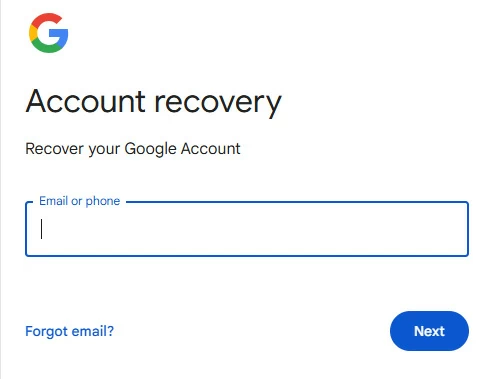
3. On the password entry screen, click Try another way to prove that you are the account owner.
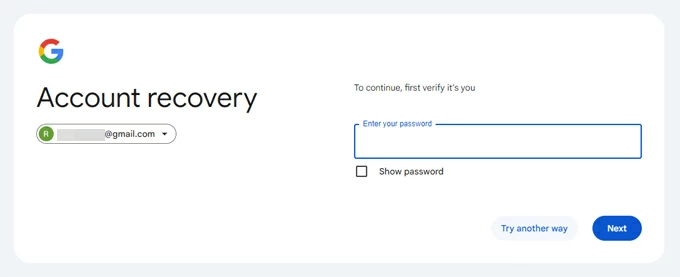
4. Select an available verification method:
Tip: If you are on another Android phone signed into the same Google account, you may also use its screen lock (passcode or facial recognition) or a prompt on that trusted device to verify it is you.
5. Follow the on-screen instructions to complete the identity verification process. Once successful, you will be redirected to the password reset page.
6. Create a strong yet memorable new password, re-enter it to confirm, and then click Save password.
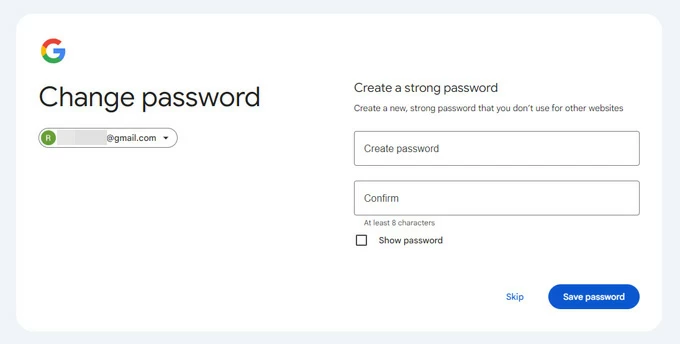
7. Finish Security Check-up if needed and wait for the updated password to sync across Google's servers. This synchronization process can take anywhere from 24 to 72 hours.
Once the sync is done, return to your locked Android phone at the "Google Verify it's you" screen and enter the newly updated Google account credentials to successfully bypass Factory Reset Protection.
When you are unable to reset your Google account password or have completely forgotten both the password and the username, using the professional Appgeeker Android Unlocker is the most effective and secure way to bypass Factory Reset Protection on your Android phone or tablet without verifying the original Google account.
Even if the device is stuck in a locked FRP state, this software can locate and exploit vulnerabilities within the setup wizard to successfully remove the FRP lock. Most importantly, it does not require complex technical procedures or rooting your device. With just a few simple clicks, you can bypass Factory Reset Protection without triggering the previous verification requirements, allowing you to regain full access to your Android device.
The software boasts extensive compatibility, supporting all major Android brands and models across various OS versions, including the latest releases.
1. Download and install Android Unlocker on your computer. Launch the program and select the Bypass Google FRP Lock option from the main interface.
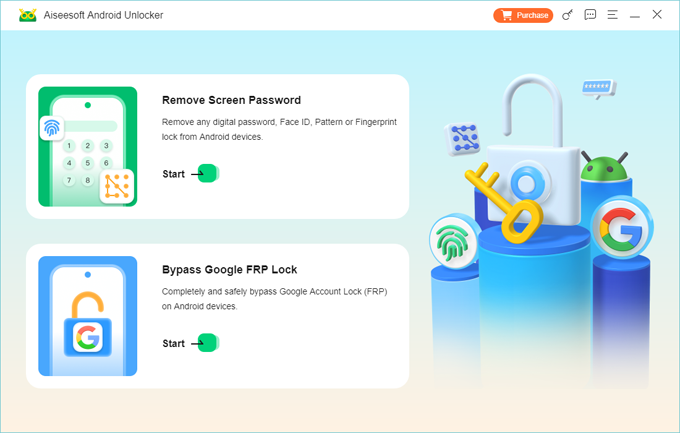
2. Use a stable USB cable to connect your Android phone or tablet to the computer. Then, select your device's manufacturer from the brand list provided.
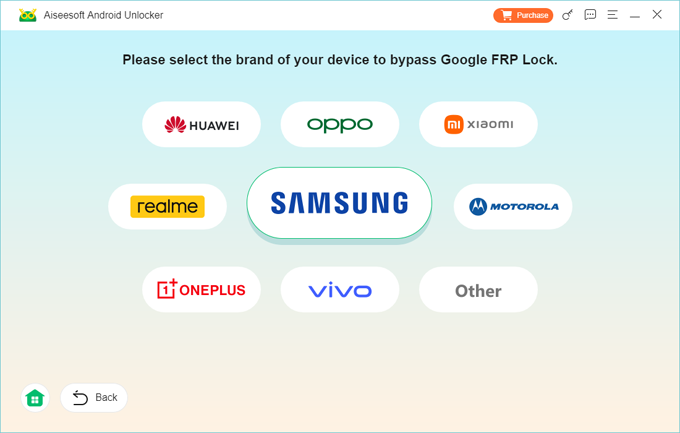
3. Click Bypass Now and follow the tutorials to configure the environment required to bypass Factory Reset Protection. For example, you need to enable USB debugging mode on Samsung devices.
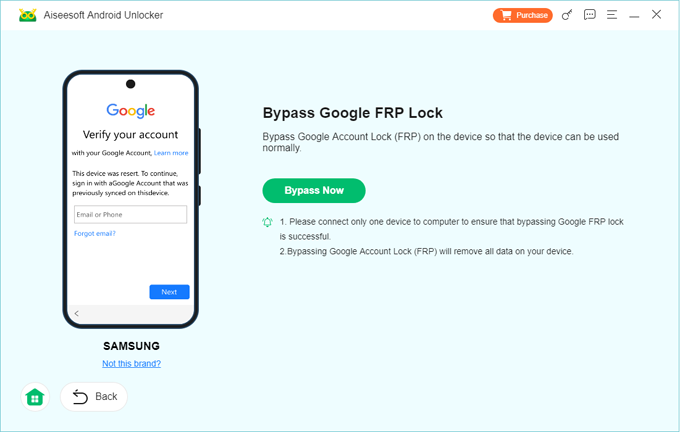
4. Once everything is ready, the Factory Reset Protection bypass process will start automatically. Wait for the process to complete and do not disconnect the device.
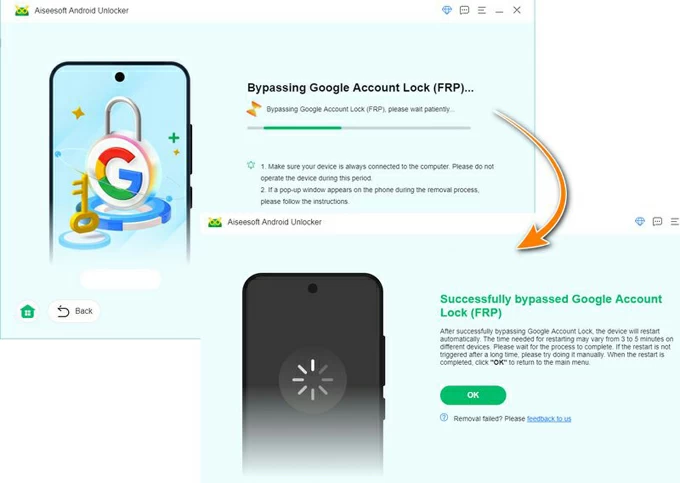
After the process finishes, your Android device will restart and the FRP lock will be removed. You can now go through the initial setup and use your phone normally without needing any previous Google account information.
TalkBack accessibility service is deeply integrated with the Android system. In older versions of the system — particularly on Android devices running versions prior to Android 12 — this service sometimes exposed indirect navigation routes that allowed users to reach restricted areas during setup and bypass Factory Reset Protection for free without PC.
However, this method is quite cumbersome and requires both patience and a certain level of technical skill.
1. Follow the on-screen prompts to connect your FRP-locked Android device to an available Wi-Fi network.
2. Press and hold the Volume Up button and the Power button together to activate TalkBack.
3. On the screen, draw a large inverted L with your finger to trigger the Voice Commands menu, then tap Use voice commands.
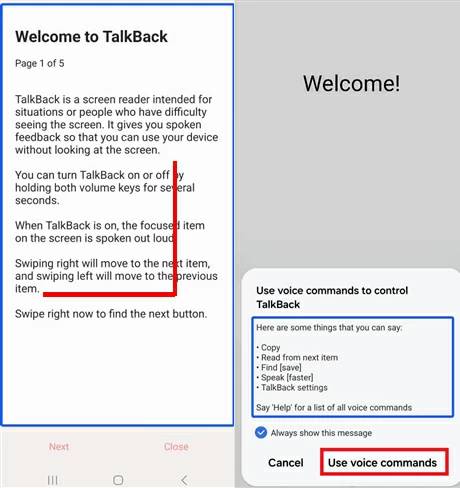
4. Speak clearly into the microphone: Open YouTube. This will redirect your phone to the YouTube web interface.
5. Press and hold the Volume Up and the Power buttons again to turn off TalkBack.
6. Within the YouTube app, tap the user icon > Settings > History & Privacy > YouTube Terms of Service. This action bypasses the setup wizard and launches the Chrome Browser.
7. Search for and download a FRP bypass APK (such as the Mobile Team FRP Bypass APK). If prompted, allow the browser to Install Unknown Apps.
8. Follow the specific instructions provided within the APK to perform the Factory Reset Protection bypass. This process usually involves adding a new Google account to the device to override the old one.
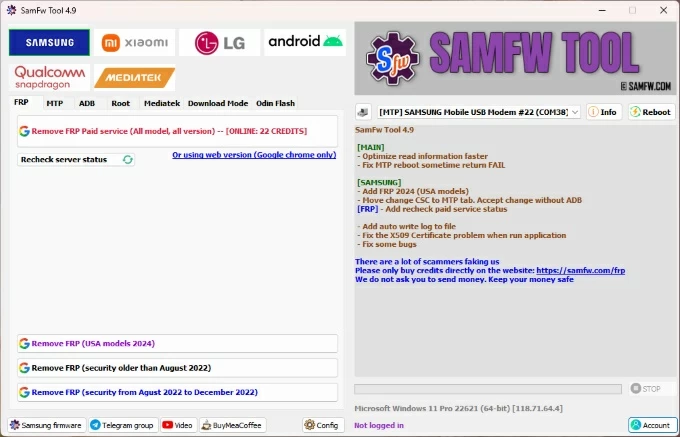
SamFw FRP Tool is also a well-known specialized tool designed for Android devices — particularly Samsung models — to bypass Factory Reset Protection. It allows you to disable the FRP lock without being forced to complete Google verification.
1. Download the latest version of SamFw FRP Tool from a trusted website and plug your Android device into the computer.
2. Ensure that the correct USB Drivers compatible with your specific Android device are installed on your PC.
3. Open the SamFw FRP Tool and select your device's manufacturer/brand from the menu.
4. On your Android phone, tap Emergency Call on the lock screen and dial *#0*# to enter the hardware diagnostic mode.
5. Click the Remove FRP feature within the tool. If a prompt appears on your phone screen, tap Allow to authorize USB debugging.
6. The software will begin the Factory Reset Protection bypass process. Once completed, your device will reboot, and the Google verification requirement will be gone.
Note:
Finally, if none of these methods work for your Android device, you can contact the device manufacturer or an authorized service provider to assist you in bypassing Factory Reset Protection.
But you must pass legitimate ownership verification. This typically requires you to provide the device's IMEI number or serial number, and submit proof of purchase or other ownership documentation.
Final thoughts
Factory Reset Protection often feels intimidating because it appears at the worst possible moment—after a factory reset, when users expect a fresh start. But FRP is not designed to permanently block devices. It is intended to pause access until ownership is clarified.
As long as you are the legitimate owner of the Android device, you can successfully bypass Factory Reset Protection and unlock your device using the methods introduced above.
To avoid falling into the same Factory Reset Protection trap in the future, you can remove your Google account from the Android device. This disconnects the link between your hardware and Google's security services. Here is how to do it: