
How to Unlock iPhone with iTunes


Complete Samsung FRP lock reset guide for legitimate users. Understand FRP, why it happens, and how to unlock Galaxy devices without Google account access after reset.

Quick Tip: Appgeeker Android Unlocker is your ultimate solution to bypass FRP lock on Samsung after reset and remove Google verification easily - without resetting Google account password. Fast, secure, and works on most Galaxy devices.

Learn safe and effective FRP removal methods for resetting Google lock on Samsung phones of all models to regain access.
The FRP lock screen is where you can enter your Google account and password to unlock a Samsung Galaxy after it's reset to factory settings. You power on the phone, set it up, and then something happens.
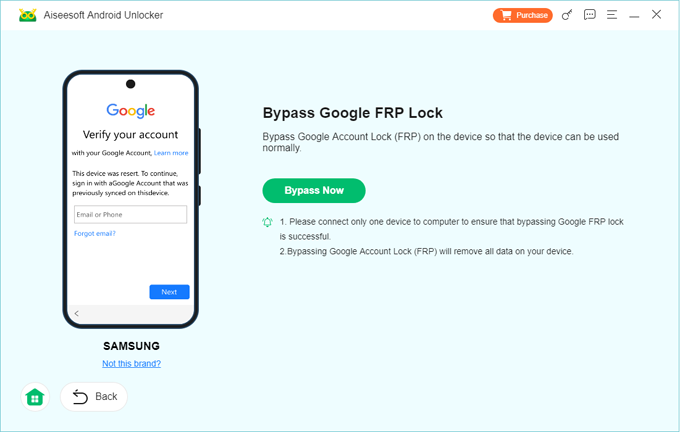
The Verify Your Account screen informs you with a message "This device was reset. To continue, sign in with a Google Account that was previously synced on this device."
If you've forgotten your Google password, lost access to that old Gmail account, or bought a used phone where the previous owner didn't sign out, you are now encountering a FRP lockout (Factory Reset Protection), which a frustrating roadblock for legitimate owners.
But don't panic. You aren't stuck. Discover how to reset FRP on Samsung Galaxy without original Google account in this comprehensive guide. Regardless of your Android or One UI version, you can find a few FRP bypass routes for Samsung's FRP locks reset, by means of resetting your Google account password or completely removing the FRP restrictions. Once FRP is reset or bypassed, you'll get in your Samsung phone again.
Table of contents
To reset the FRP for Samsung phone after factory reset, it's essential to understand what is Google FRP and why it blocks your access to your device.
FRP, also known as Factory Reset Protection, is a security feature introduced by Google and implemented across Samsung Galaxy devices running Android 5.1 and later. It comes to protect your data if any unauthorized users reset your phone. Without the original Google login details, it's challenging to unlock FRP to restore device access.
When does FRP lock activate on Samsung?
FRP is enabled automatically when a Google account is added to the device, and is triggered when the phone is factory reset through Recovery Mode, SmartThings Find remote erase, or other unauthorized reset methods instead of via the system's Settings app.
What happens when FRP on Samsung triggers?
Once Google FRP is triggered, the phone requires the last synced Google account. You cannot access the home screen without verification. Plus, a factory reset won't help resetting FRP or bypassing Google verification on the Samsung phone. This means even a legitimate owner can get locked out if they forget their account details.
The good news is that being stuck on Google lock is not end of the world - you can reset the factory reset protections on your Samsung phone if you can't remember the associated Google account & password. Below are three main methods to reset or bypass Google FRP lock from Samsung Galaxy, guiding you from frustration of being locked out to the satisfaction of a fully functional device.
When an erased Samsung phone requests for a Google account that you can't log into, you can always try Google Account Recovery to recover the email or reset the password for the FRP lock.
If you know your username but forgot the password, you can reset it to get past the Google lock without relying on any Samsung FRP bypass tools. This requires some form of authentication of the linked recovery options before you manage to reset the FRP Google password for Samsung.
1. Go to the Google Account Recovery page on a separate computer or phone.
2. Enter your email or the phone number associated with the account.
3. Use "Try another way" if you forgot the password for resetting FRP, especially your phone hasn't been used for a long time.
4. If you have a recovery email or phone number set up, Google will send a code to verify your identity.
5. Follow the prompts to reset the password of your Google account. Make sure the new password is secure and easy to remember.
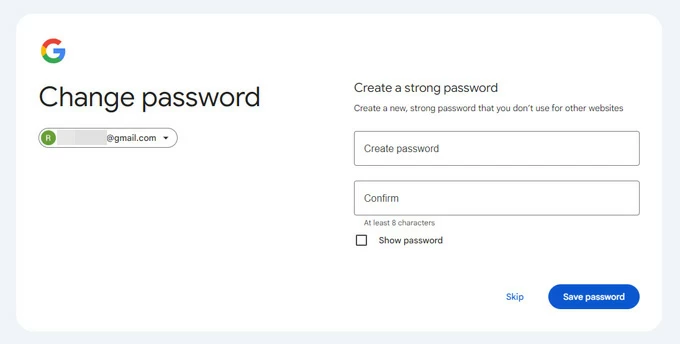
Important! After your Google password to FRP has been reset, it may take 24 to 72 hours to update and sync the new credentials with the locked device. Do not attempt any logins during this window, as it may reset the waiting time before Google lock bypass.
In case you forgot or lost your username (Gmail address), it's still possible to find and recover your Google account you use to sign in so that you can circumvent the FRP on your Samsung phone that's locked out.
1. Go to Find Your Email page on a computer or another accessible device.
2. Enter your phone number or recovery email that's tied to your forgotten Gmail.
3. Answer a series of questions as accurately as possible to authenticate your identity.
4. Depending on your account's security settings, Google will send you a verification code via recovery email or phone number or Authenticator app.
5. After verification, reset your password when prompted to have your Google account recovered.
This way, you reset your Google account's email and password by which to skipping the Google verification after factory reset and overcome the Samsung FRP lock with full device access. Whether you just forget your Google account password, or are completely getting locked out of the account, you're able to reset the credentials and get Google account back.
Tip: Google Account Recovery works to change the previously synced Google account to reset FRP locks and unlock Samsung of all models. However, this is not helpful for second-hand devices with account info is completely unknown.
If you're struggling to reset your Google lock's account and password for verification, you're still in luck. You can fully remove FRP from Samsung even without Google logins by using trusted FRP bypass tools.
When you have no access to the Google account - either because you forget it or don't know it at all, or because you acquired or inherited a preowned device without the Google account being removed to disable FRP first, one of the simplest ways is to use Appgeeker Android Unlocker.
Equipped with powerful Android FRP unlocking features, the software is able to bypass Google verification and remove FRP lock even without the original Google account & password. This means that you don't need to reset Google credentials on your FRP-locked Samsung device. You just need a computer and a USB cable for a Samsung FRP removal. The tool is user-friendly and requires no advanced skills, allowing you to get past Google account verification screen from all Samsung models (Galaxy S series, Z Series, A series, Notes series, etc.) with ease.
When you do not remember your Google account & password, here's how to reset Google FRP for Samsung without Gmail credentials using Appgeeker Android Unlocker. After that, you can take full control of your phone and register with a new Google account to enjoy Google services.
Step 1. Launch Android Unlocker on your Windows PC and then, on the main interface, choose Bypass Google FRP Lock module.
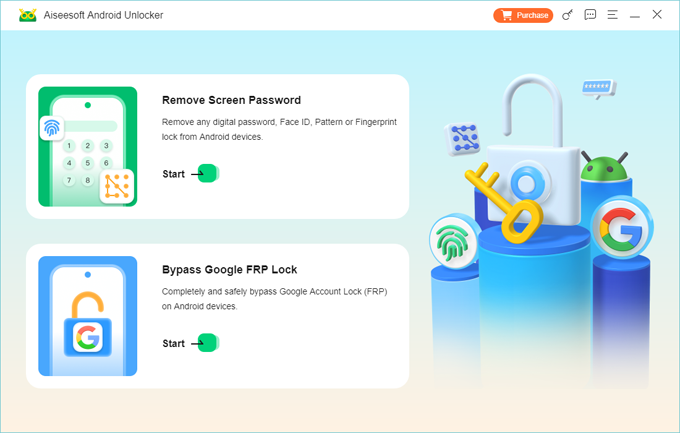
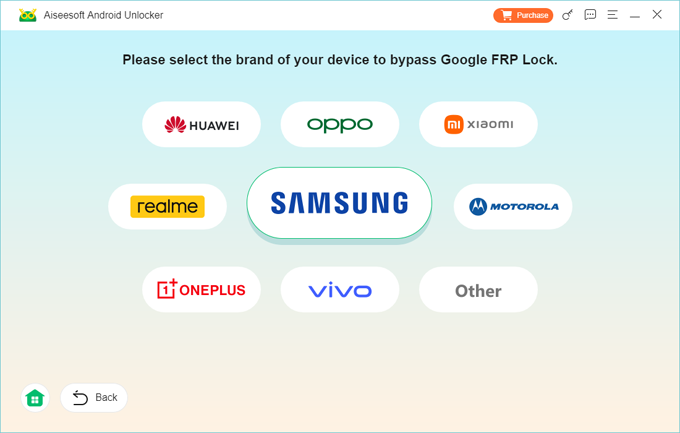
Step 2. Plug your FRP-locked Samsung phone to your computer via the USB cable, and choose SAMSUNG.
Step 3. If your Samsung phone is detected, click on Bypass Now button to move on.
Follow the onscreen instructions to put your device into a diagnostic mode. The steps may vary based on your Samsung model. Click Next button.
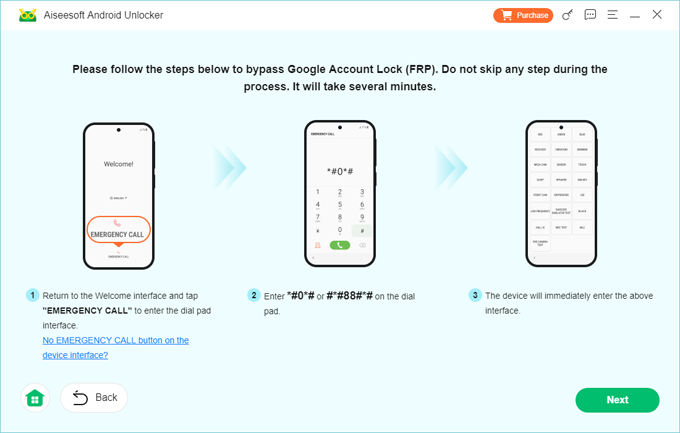
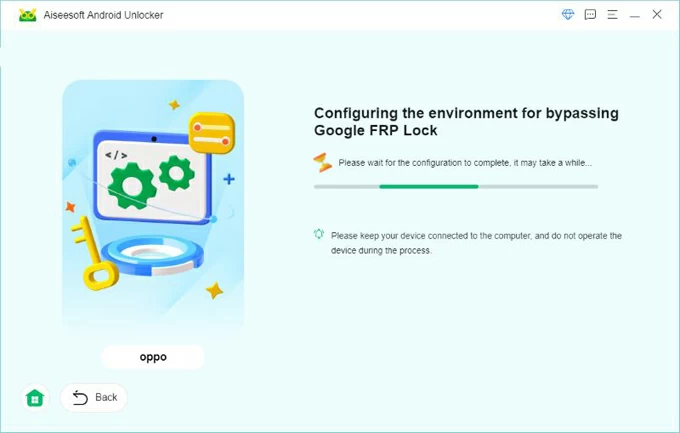
Step 4. The software begins configuring FRP bypass files to reset Android Google lock. Wait for a while to let it do its business.
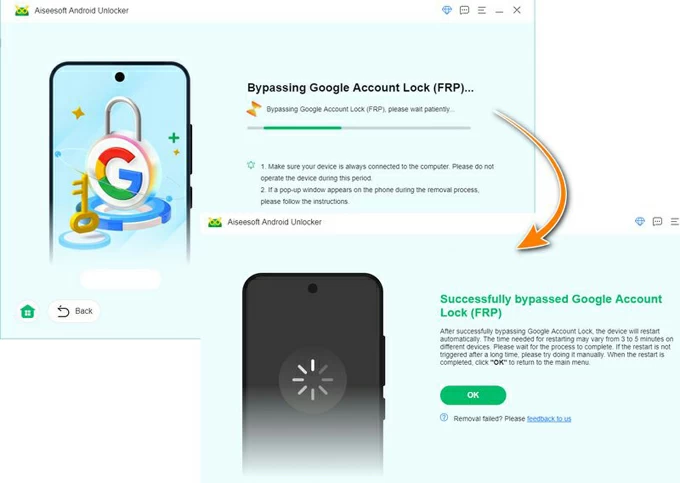
After configurations, the utility proceeds to bypass FRP with PC and remove Google account completely from a Galaxy device.
When you see the "Successfully bypassed Google Account Lock (FRP)" screen, click OK to finish.
Your Samsung phone restarts with the Factory Reset Protection hurdle resolved. Set up the device with a new Google account and go straight to device's home screen for full use.
Without resetting Google sign-in credentials you've forgotten, Appgeeker Android Unlocker helps you unlock a Google-locked Samsung phone after reset by getting rid of the Google account. Besides, the tool also offers options to remove screen locks like password, PIN, pattern, fingerprint, face recognition for unlocking.
Check also: how to unlock Android phone if forgotten pattern
If you purchased a second-hand Samsung Galaxy device that is locked by factory reset protection (FRP), you can go through Samsung FRP bypass process by just contacting the previous owner if reachable to remove the device from Google account remotely via Google Find Hub.
Another option for Samsung FRP lock reset is to seek help from Samsung Authorized Service Center or Samsung Support Online. Samsung technicians can remove FRP only if you prove you're the device owner with IMEI or serial number and valid ID, as well as have Original purchase receipt or invoice. While this may take some time for Samsung official to authenticate your identity, there would be no software risks.
When everything fails, your best bet is to take advantage of the professional all-in-one FRP unlock tool mentioned above to reset or remove a Google account lock on Samsung phone without any proof of Google account or purchase, ensuring that the previous owner's Google account is eliminated for good.
Resetting a FRP lock on a Samsung Galaxy without Google account can feel overwhelming—but it's completely solvable if you choose the right approach. The quick navigation:
By understanding how FRP locks your Samsung phone after an unauthorized factory reset and choosing a method that fits your situation, you can safely regain access to your FRP-locked Samsung Galaxy and never face the FRP lockouts again.
Q1- Is bypassing Google FRP lock legal?
If you are the legal owner of the device, bypassing the FRP lock to regain access to your property is generally legal. However, performing a Google lock bypass on stolen or lost devices is a criminal offense. Plus, FRP lock removal tools are intended for rightful users who are locked out of their own devices.
Q2- Does a factory reset remove FRP from a Galaxy phone?
This depends on how you reset your Samsung phone.
If you run a factory reset via system's Settings app, the device will ask for your Google account password to log it out and to confirm that you're sure to delete all data and settings. FRP is disabled this way.
However, a factory reset via Recovery Mode with hardware buttons is exactly what triggers the FRP lock. You'll be required the original Google account credentials used on that Samsung device after the reset.
Q3- How can I reset my Google account password when I stuck on FR lock screen?
By logging into Google Account Recovery page with the associated email address and verifying your identity with the recovery phone number or email, you can easily reset your Google password, and then use it to bypass Google verification and complete the setup.
Q4- Can I reset FRP lock on Samsung without the original Google account?
Yes. If you cannot recover the original Google account or reset the Gmail password and have no proof of purchase for Samsung support, you can reset FRP lock by removing it using a reliable FRP removal tool, provided you are the legitimate owner of the device.
Q5- Can Appgeeker Android Unlocker reset Samsung phone's Google FRP lock?
Appgeeker Android Unlocker computer-based software is designed to remove Google account verification and FRP lock on Samsung Galaxy devices after a factory reset, instead of changing the Google account or its password to something new. It is 100% safe to use and supports all Samsung models, as well as works for FRP lock bypass without requiring the previous Google account password.
Q6- How to avoid Google FRP lock on Samsung device?
To prevent being locked out after a future reset, sign out of the Google account before performing the reset: Go to Settings > Accounts and backup, then tap Manage accounts and select your Google account. Select Remove account and confirm with your PIN/Password/Pattern.