Samsung FRP Unlock Tools — Regain access after a reset



Productivity tools help you manage tasks, projects, time, people, and information. These bring you a more structured workflow to track progress and support collaboration. These tools come in a myriad of choices, with each one doing one thing perfectly. Whether it is project management or tracking employee time, there is a tool to supplement your workflow.
We bring you the best for this year. Each of them reviewed based on features and specific productivity functions. So no matter what you need to do, these tools are here to get things done.
Here are the top tools to consider to unleash that productivity nerd from within.
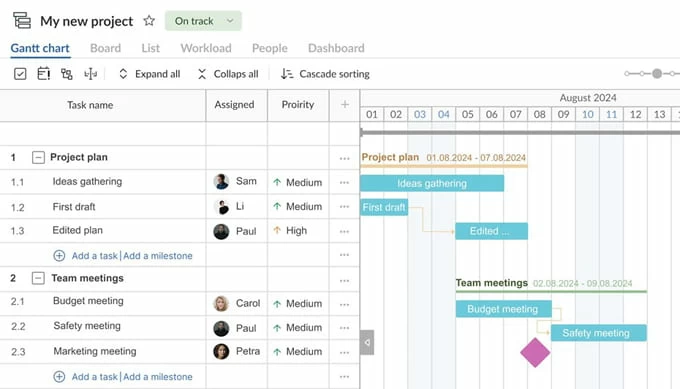
GanttPRO handles planning for individuals and teams of any size. For those preferring a more visual overview of projects, the Gantt charts display tasks, dependencies, deadlines, and assignees at a glance. Users have the option of creating multiple projects and linking related tasks across timelines. Plus, you can easily switch to the Grid, Board, or even List view for a different perspective.
Time management tools help you track task duration and deadlines. Templates allow fast project setup. All of these features come together in GanttPRO to offer you a seamless Gantt chart project management software.
A complete remote hub for your team, Basecamp aims to be your all-in-one tool for tasks, communication, brainstorming, CRM, and more. Each project you create on Basecap comes with separate message boards, to-do lists, and automatic check-ins so teams are able to create project-specific apps as per their workflow needs. Notifications from Basecamp are also kept minimum for teams to focus more on core tasks.
A key perk with Basecamp is its flat pricing structure no matter the size of your team. Unlike other tools that offer a per user per month pricing, Basecamp covers everything under one neat price tag. Integration options are abundant too with Zapier, Google Calendar, Slack, GitHub, and more.
This one's for Apple users only. Fantastical is a super sleek calendar app for iOS and macOS. Fantastical brings all your calendars into one unified timeline and helps you manage these events and tasks using natural language input. Create meetings, set reminders, and view weather forecasts right from the homepage.
If you don't mind paying for the premium version, you get some added bells and whistles too.
Unlock premium features like conference integration, calendar-task sets, and even external scheduling links. Quick task addition widgets and easy event management make this a real productivity machine to organize your entire workweek
If you prefer your notes to stay local on your device, Anytype can be a great open source alternative to boost your productivity minus all those pesky privacy issues. Anytype stores all data locally and syncs only via peer to peer networking. Think of it more like a tool that you can use to collect and organize information. Markdown allows fast, structured content creation with end-to-end encryption baked in. Mobile apps are available on iOS and Android.
Being open source, Anytype is backed by a huge community of enthusiasts so you get access to thousands of premade templates and community workflows to help you get started. Though the learning curve can be a bit steeper than other tools in this category, this has enough flexibility for you to create some very complex setups.
Rize helps you track time on app and website usage on Mac and Windows devices so you can see where all the time went. Rize conveniently categorizes time automatically into work, communication, entertainment, and similar other categories and creates some very interactive reports. These show daily, weekly, and monthly trends. You also get a smart assistant that reminds you to take breaks during those hard sessions on the screen.
Rize offers Focus session tracking that integrates with native Mac Focus Mode. Users can analyze meeting durations and productivity scores. Cloud sync is optional, ensuring local-first privacy.
Internet security is not to be taken lightly. And if you have to juggle with hundreds of accounts and their credentials, remembering everything can be a nightmare. Storing passwords on the default browser password safe is also not safe. You need something dedicated. 1Password is an extremely simple tool that does one simple task and that is store all your sensitive information like passwords, credit cards, 2FA codes and secure notes in encrypted vaults. Once stored, use your biometrics to autofill credentials across all your devices.
You get powerful features baked in. Watchtower alerts identity reused or breached passwords. Teams and families can share credentials with permission control. And a whole lot more. With apps available for every platform along with helpful browser extensions, you can use 1Password virtually anywhere to keep your logins secure from prying eyes.
If you are fed up with all the following up on all those long email threads, Canary Mail is here to make your job a bit easier. The tool uses AI to summarize all your long email threads and draft responses based on conversational context. It is clever enough to interact with your emails through natural language queries. The unified inbox supports Gmail, Outlook, Yahoo, iCloud, and even custom domains, so all your emails live in the same place.
AI suggestions assist you to create compelling replies on both Android and iOS apps.
Subscription costs are low but when compared to other more premium alternatives in this niche, the AI features appear less polished.
Habitify gamifies habit building and makes it into a fun, rewarding exercise. The tool tracks habits across mobile and web platforms. Users can simply organize habits by time of day or context and Habitify creates a cool little display chart that shows completion rates, streaks, and daily performance.
You also get optional social features too that allow you to share challenges with your team and fight for the top spot on the leaderboards. Mood tracking and timers offer insights into behavioral patterns. Integration with Zapier and IFTTT enables automation in a click. The free plan tracks up to three habits. Premium unlocks unlimited habit tracking.
Mem is aiming to become your second brain. Convert your notes into a chronological, queryable workspace. A cool new feature you get is simply asking questions to Mem and it will find and summarize information from the memory archive.
AI integration with Mem highlights important information so it perfectly suits professionals having to work with a large number of notes. The focus here is more on interaction with the notes. Not just storing your notes and forgetting about them.
Obsidian is your perfect personal knowledge management tool. It stores all your notes as local markdown files and backlinks and graph views connect notes to visualize relationships. Obsidian gets a strong community support so you get access to a huge library of plugins to extend functionality for spaced repetition, kanban boards, and AI workflows.
Obsidian is a completely free tool. The paid version will only get you cloud syncing. The free version works completely offline and preserves all your notes in plain text file compatibility. Users control storage location as well as the file format so flexibility is a massive plus point with Obsidian.
Lunatask brings task management, note taking, and journaling with end-to-end encryption. Also get support for habit tracking along with daily tasks. The interface is solid responsive and designed for fast keyboard inputs so you can log your tasks instantly.
A top choice for ADHD planning and secure information management. Lunatask suits individuals and teams needing privacy-conscious task management with a little bit of lightweight habit tracking.
These were the 11 of the best tools that we tested this year. These really helped boost productivity both at work and at a personal level. From tools to handle your emails to tools that organize your entire day, these productivity tools will transform how you work. Each one offers something specific so choose the right one based on the features you need and the devices that you use.