
How to Transfer WhatsApp Chats from Motorola to an iPhone


If your Motorola phone is locked by a password, pattern, or PIN, this article will provide detailed methods and specific steps for unlocking the Motorola phone that is locked.

With an Appgeeker Android Unlocker, you can effortlessly unlock a Motorola phone locked due to a forgotten password, pattern, or PIN, regaining control of your device just like before.

Unlocking your locked Motorola phone without a password, pattern, or PIN first requires wiping your device.
Most Motorola lockout issues stem from simple causes — such as too many incorrect pattern attempts, facial unlock failures, or a changed PIN / password you can't remember.
As Android systems enhance security measures, many older methods for unlocking locked Motorola phones are no longer effective. But don't worry — this article will guide you through all practical methods on how to unlock Motorola phone that is locked, restoring it to normal use. You should note, however, that most modern unlocking techniques require resetting your Motorola phone to regain access.
Unlocking a Motorola phone that's currently locked out is not difficult, whether you are stuck on a pattern, PIN, or password screen lock. However, you need to be prepared and understand certain prerequisites to avoid falling into deeper security locks (such as FRP).
Table of contents
If you have forgotten your lock screen password, PIN, or pattern, try waiting a while to see if you can recall the correct credentials. Unlocking a locked-out Motorola phone without password/PIN/pattern will permanently erase all data and settings unless you have a prior backup.
Your locked Motorola phone should have sufficient battery life, preferably above 50%, to avoid the unlocking process being interrupted by battery depletion.
Do you remember your Google account credentials? After freeing a locked Motorola smartphone from its lock screen, you may be asked to enter the originally associated Google account and password for verification. If you cannot provide this information, your Motorola will be locked by Factory Reset Protection screen.
Google Find Hub is not just a "phone finder." It is part of the Android device trust system. If your Motorola phone is still associated with your Google account and connected to the internet, Google can remotely unlock the Motorola phone that is locked without a computer. This means you don't need to crack the phone — just re-authorize through Google servers to unlock your locked Motorola phone without a password/PIN/pattern.
1. On another phone or computer, open a web browser and visit Google Find Hub.
2. Sign in using the same Google account that is currently linked to your locked Motorola phone.
3. After signing in, navigate to the Devices section, where Google will display all devices associated with that account.
4. Click on the specific locked Motorola phone you wish to access.
5. From the action menu, select Factory reset device.
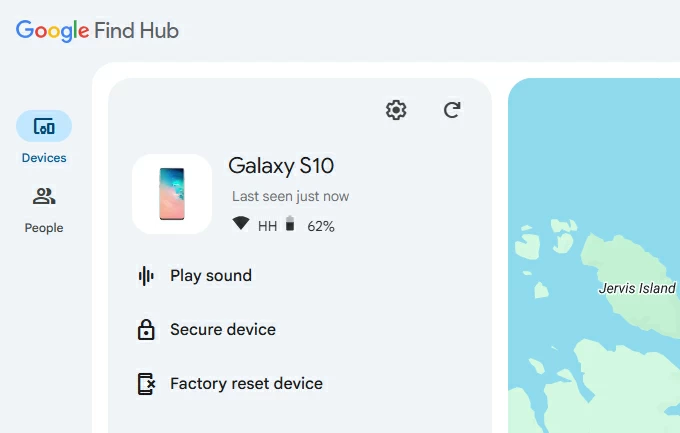
6. Read the reset warnings and click Next.
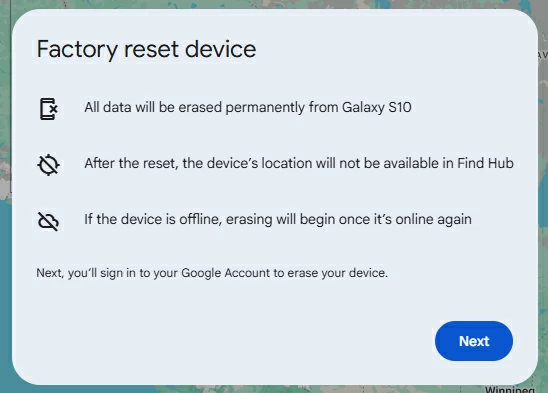
7. You will be prompted to confirm your Google account password again. After verification, click Reset to begin unlocking the locked Motorola phone.
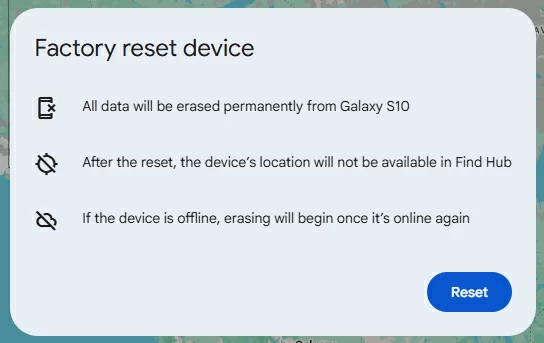
Once the unlock process is finished, the screen lock will be removed. Your Motorola will prompt you to set up the device from scratch. Follow the setup wizard and verify your Google account to regain full use of your Motorola phone.
Note:
In the case where you've also forgotten your Google account, a professional Appgeeker Android Unlocker becomes the simplest and fastest method to unlock your Motorola phone if you're locked out. The software is designed to remove all types of screen locks—including password, PIN, pattern, and biometric lock—without requiring any credentials. It supports most Motorola models and is fully compatible with the latest Android versions.
Beyond unlocking a completely locked Motorola phone, it is also capable of removing the Google FRP lock on Android devices without the need for the previously synced Google account information.
1. Download and install Android Unlocker on your computer, then plug your locked Motorola phone into the computer using a compatible data cable.
2. Run the software and select Remove Screen Password to get rid of the locked screen on your Motorola phone.
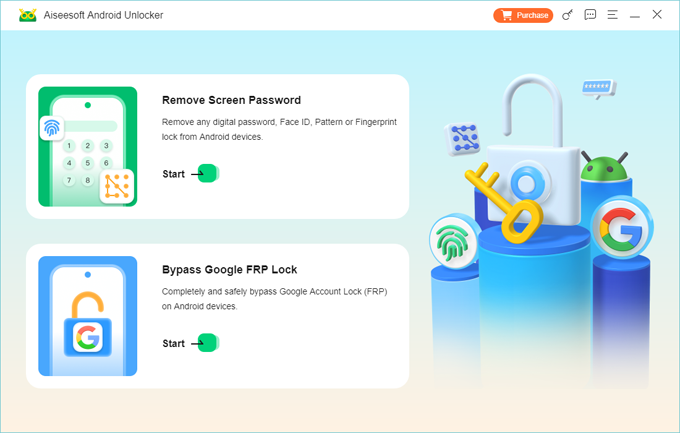
The software will automatically detect your Motorola phone; if it doesn't, click "The device is connected but cannot be recognized?" or "Try Other Unlock Methods" to find a solution.
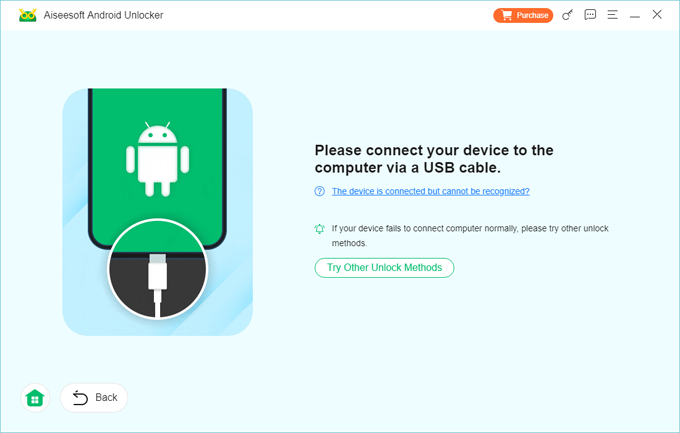
3. After successful detection, click Remove Now to start bypassing the screen lock on your Motorola phone and release the locked state of your Motorola phone — this process won't take long.
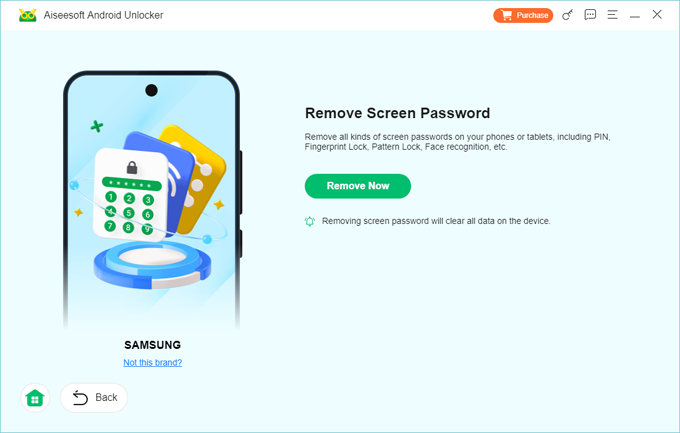
When you see "Remove Successfully," your Motorola has been unlocked with no screen lock barriers. If you encounter FRP issues during the setup process, you can also use this software to bypass the FRP lock on your Motorola phone.
When a Motorola phone is completely inaccessible—for example, due to a dead screen, forgotten lock screen password, or inability to access the Google account—using the hardware recovery system can also unlock your Motorola phone that is locked, bring your device back to life. This system operates independently of the Android system and, even if the screen is locked, can clear all data on the phone, including the previously set lock screen password, PIN, or pattern.
1. Completely power down your phone. Once the screen goes black, press and hold the Volume Down and Power buttons simultaneously for about 5 to 10 seconds.
2. On the Bootloader screen, use the Volume buttons to cycle through the options until Recovery Mode is highlighted in the text box, then press the Power button to select it.
3. You will see a "No Command" screen featuring an Android robot with a red exclamation mark. Keep pressing the Power button, at the same time, quickly press and release the Volume Up button to enter the hidden Recovery menu.
4. Use the Volume buttons to navigate to Wipe data/factory reset, then press the Power key to confirm.
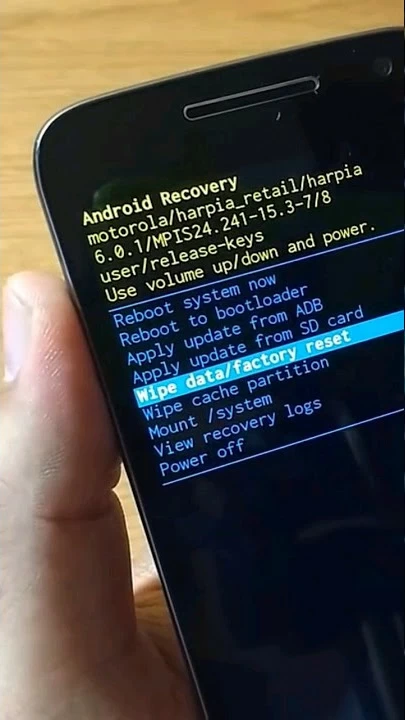
5. Use the Volume Up and Down buttons to select Factory data reset, then press the Power button to begin restoring your Motorola phone to its factory settings.
6. Once the script finishes, use the Volume buttons to choose Reboot system now and press the Power button to restart your phone to its initial state—this will also unlock the Motorola's locked state.
Note:
There's a hidden trick to unlock the locked Motorola phone without losing data, but it only applies to Motorola devices running Android 4.4 or earlier. After multiple failed login attempts, the Android system allows the device owner to verify their identity using their Google account to reset the forgotten screen lock password, PIN, or pattern, thereby re-entering the locked Motorola phone.
1. Enter the wrong pattern or PIN or password multiple times, at least five times.
2. The system will lock you out for 30 seconds, but a new option will appear at the bottom of the screen: Forgot Pattern? / Forgot Password? / Forgot PIN?
2. Tap that button. The system will prompt you to choose a recovery method. Select Enter Google account details.
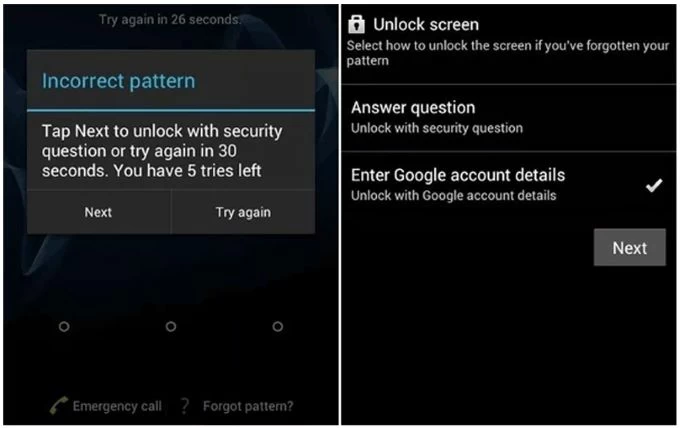
3. Input the Gmail address and password tied to your locked Motorola phone.
4. After the server verifies your identity, the phone will immediately let you set a new screen lock to get into your phone.
Note:
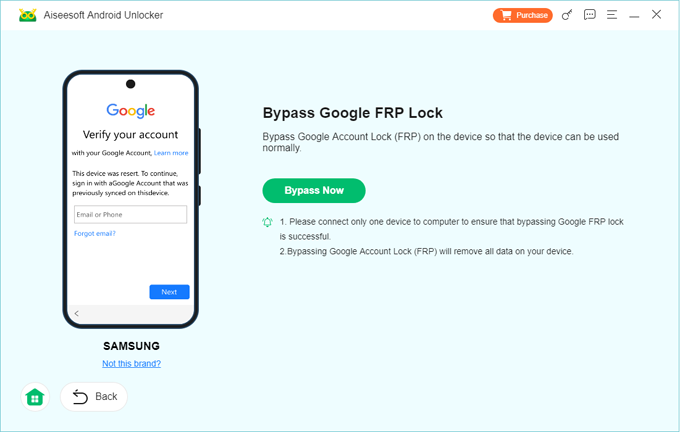
If you have successfully broken through the Motorola lock screen barrier but find yourself stuck on the post-reset FRP screen, the safest and most reliable way to unlock the Motorola phone locked by FRP is to use Appgeeker Android Unlocker — especially when you have no memory of your Google account or password. This software can bypass Google verification on your Motorola phone, thereby removing the FRP lock and allowing you to access your device again.
Also read: How to remove previously synced Google account from Android
Conclusion
Unlocking a Motorola phone locked by a screen password, PIN, or pattern isn't complicated; the key is to pick the best method to unlock your device based on your own situation and the state of the locked Motorola phone.
After successful unlocking, it's recommended to set an easy-to-remember screen lock or enable biometric recognition, and get into the habit of backing up your data to minimize the irreversible consequences of forgetting your Motorola password.
1. Can I unlock a locked Motorola phone without losing my data?
Modern Motorola smartphones do not allow you to unlock the device without data loss once you have forgotten the screen lock. You must perform a factory reset to unlock a locked Motorola phone; this is a security measure designed to prevent unauthorized access and protect your data from theft.
However, if you have an older Motorola device running Android 4.4 or lower, you can still use your Google account to reset the screen lock to bypass Motorola lock screen without factory reset.
2. Does unlocking my screen also "SIM Unlock" my Motorola phone for other carriers?
No. It is vital to distinguish between a Screen Lock (security for your personal data) and a Network/SIM Lock (restriction to a carrier like Verizon or AT&T). This guide addresses screen access only. If your Motorola phone is locked to a specific carrier, you must contact that carrier directly or use a paid IMEI unlocking service once you have regained access to the phone's interface.
3. Does Google Find Hub work on all Motorola models?
It works on almost all modern Motorola phones as long as: