Forgot iPad Passcode. How to Unlock


This complete guide shows different free ways to unlock a Samsung phone and remove all screen locks - password, PIN, pattern, Google FRP, and SIM network lock.

Appgeeker Android Unlocker is an all-in-one program that can unlock Samsung phone without password, PIN, or Google account, offering a fast way to delete the lock method and Google FRP for full access.
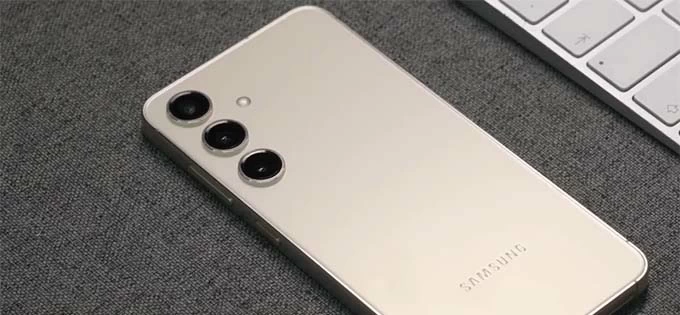
Samsung phone is locked? Unlock screen, FRP or carrier network now with the right methods.
Samsung Galaxy phones are designed with strong security protections, and that's great for privacy. But when those protections work against you—whether it's a forgotten password, Google FRP after a factory reset, or a network lock restricting your SIM card, they'll be considered as barriers to block your device's access.
Hope is not lost. Your Samsung phone can still be opened with reliable Samsung unlock tools. This comprehensive guide will break down the latest & practical ways to unlock Samsung phone for free—covering both carrier unlocks (for network flexibility) and screen unlocks (for forgotten passwords and FRP locked to the Google account), after which you should be able to reclaim and get into your Galaxy device seamlessly.
Let's dive in!
Table of contents
Before jumping into the how-to guide for Samsung unlock, it's essentials to understand what kind of security lock is preventing you to unlock the Samsung device.
Screen lock - password, pattern, PIN, biometrics
Setting up lock method protects the device from unauthorized access.
Factory Reset Protection - Google FRP lock
It will trigger automatically after an external factory reset and get you stuck at the "Verify your account" without the associated Google credentials.
Network lock or SIM lock
A restriction placed by carrier (like Verizon, AT&T or T-Mobile) to ensure the device is used on the network until the contract or payment plan is fulfilled.
Knowing which lock you are facing is the first step toward a successful unlock for your locked Samsung Galaxy (S series, Z Fold, Z Flip, Note series, A series, M series, F series).
We'll cover each lock you may encounter separately, explain why it happens, and walk you through step-by-step solutions that actually work for unlocking a Samsung phone free.
In the event that you're stuck on the lock screen after forgetting the Samsung password, you have several free paths ranging from "Zero Data Loss" to "Complete Wipe" in order to have your Samsung Galaxy unlocked without needing the PIN, password or pattern.
Here are four best free Samsung unlocking software applications that you can take to get into a locked Samsung phone hassle-free.
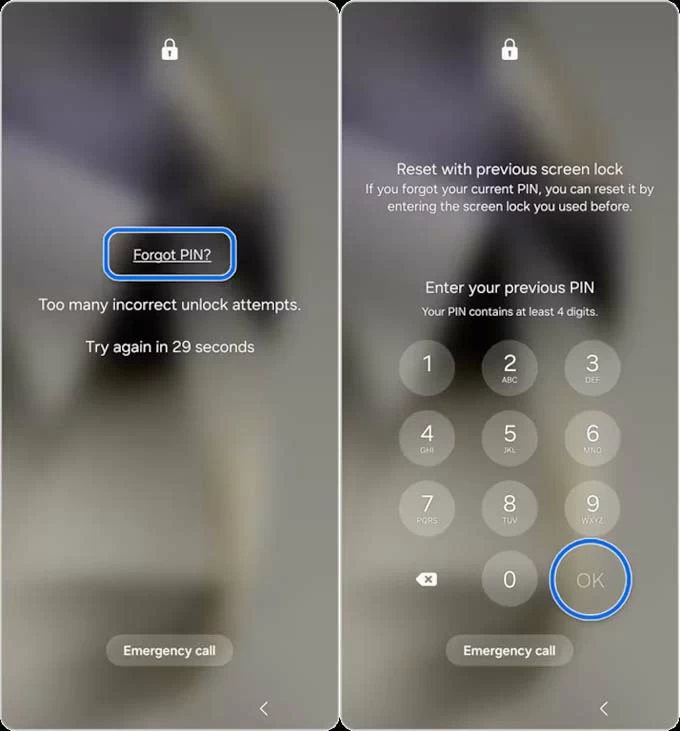
For Samsung running One UI 6.1 and later, there's a great chance of unlocking Samsung password without losing data. The "Reset with previous screen lock" feature has been developed into the system, allowing to bypass the need of factory-resetting Samsung device when it's locked.
If you recently changed your lock code and forgot the new one, you can use your previous lock method (password, PIN, pattern) to gain access for up to 72 hours after the change, and then reset the password to something new. Here's how.
1- After five incorrect unlocking attempts, the device's screen will display Forgot PIN (or Forgot Password, Forgot Pattern) alert.
2. Tap on Forgot PIN. "Reset with previous screen lock" screen will appear.
3. Enter your old PIN code to unlock Samsung instantly.
4. Follow the prompts to set a new password, PIN, or pattern as desired.
Samsung also offers an official free remote unlocking feature via SmartThings Find.
Provided that you have a Samsung Account logged in and "Remote Control & unlock" option (or Find My Mobile) was toggled on in your settings before the phone was locked, this is your best bet to perform a factory reset to completely remove the forgotten or unknown password, PIN code or draw pattern from the lock screen on any Samsung devices - as long as your phone has an active internet connection.
Here's how to unlock your Samsung screen over the web in seconds:
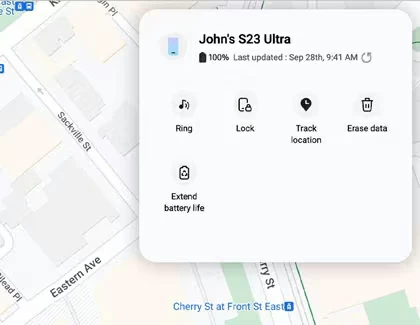
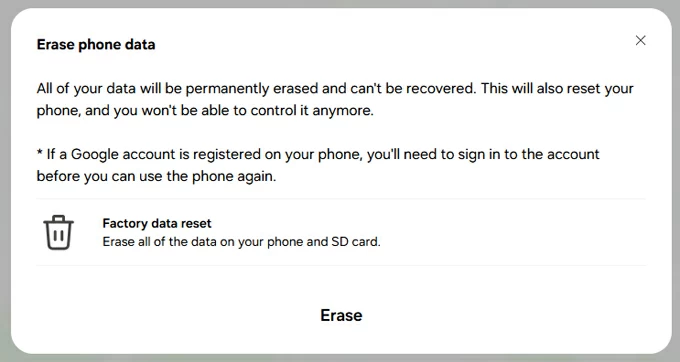
Your phone's screen lock (PIN, Pattern, or Password) will be remotely wiped, and your Samsung phone is unlocked eventually.
Note: For this method to work, the locked Samsung phone must be turned on, connected to Wi-Fi or cellular data, and have had the remote feature enabled in its account settings prior to being locked out.
An offline factory reset is another way to free unlock the Samsung phone and remove the screen lock information. This reset the hardware and wipe off everything, letting Samsung unlock the bootloader and PIN/ pattern/ password.
To manually reset a Samsung phone when locked, you need to enter Recovery Mode and use the "Wipe data/factory reset" option to erase all data including the Samsung locks.
1- Power down the phone. The shutdown requires the password; If you can't provide the credentials, you need to wait the battery power to run out.
2- Use a data cable to connect the device to the computer.
3- Boot the password-locked Samsung into recovery mode by pressing certain buttons. For most modern models, press Volume Up and Power buttons at the same time until Samsung logo appears. Older models can apply Volume Up + Power + Bixby, or Volume Up + Power + Home button to enter recovery mode.
4- When Android Recovery menu opens, scroll through to select Wipe data/factory reset option (or Delete all user data option)
5- Choose Factory data reset option (or Yes, Yes – delete all user data option).
6- Samsung will now reset the entire device, which takes only a few seconds. This action cannot be undone.
7- Continue to choose Reboot system now option to finalize the process.
8- Let Samsung restart to the welcome screen, and follow the prompts to set up the device.
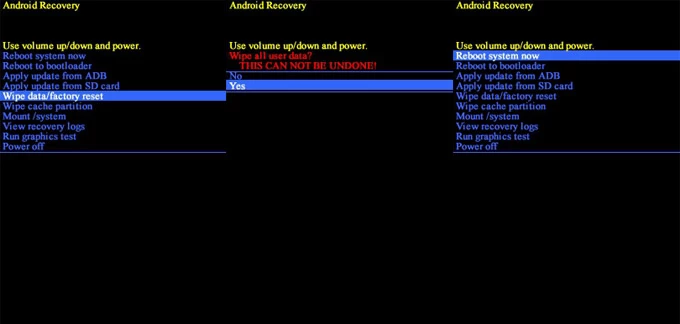
By performing a factory reset on Samsung without password using buttons for free - even you don't have Samsung account access or there's no internet connection on the phone, you should be able to unlock your Samsung phone or tablet without a hassle.
If you have trouble of using the native free Samsung unlock toolkits, your ultimate solution for getting the Galaxy's screen unlocked is to take advantage of a third-party program. One reputable and effective tool is Appgeeker Android Unlocker, which is a one-stop solution that serves for screen lock removal and Google FRP bypass just to unlock Samsung, Motorola, OnePlus, Pixel, Xiaomi, VIVO, OPPO, Huawei, Infinix, and any other Android device of all models.
For unlocking Samsung screen when you do not remember the lock method, the software automates the factory reset process and removes the password, PIN, pattern, and biometrics directly in just a few simple clicks.
Equipped with a clear-cut interface along with onscreen instructions, even the beginners don't have to worry about how to unlock a Samsung phone without knowing the password. Here are the detailed steps.
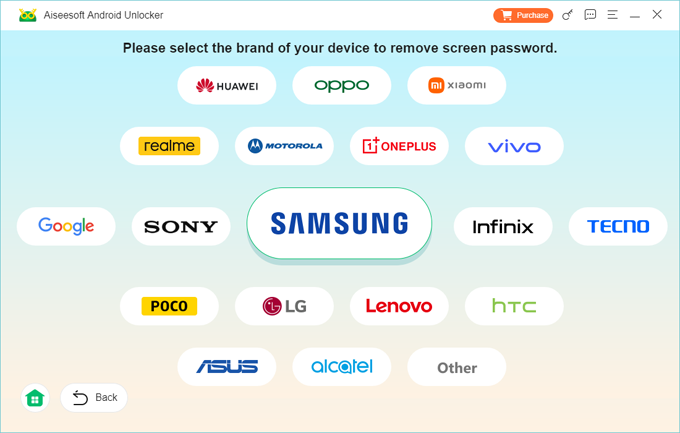
Step 1. Launch Android Unlocker on a PC, and opt for Remove Screen Password mode.
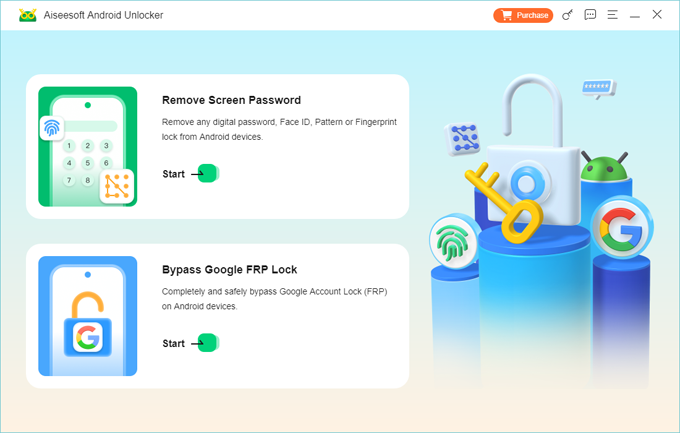
Then, choose SAMSUNG that matches your device.
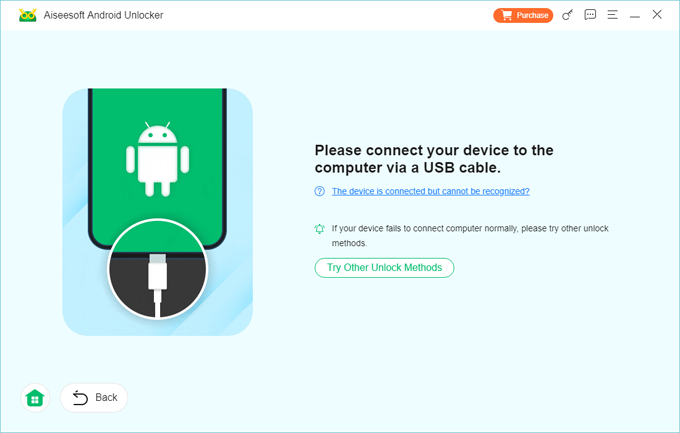
Step 2. Attach the phone with the computer through a USB cable.
If the phone won't appear after connection, you'll need to follow link on the screen to put it into restore mode.
Step 3. When everything is ready, hit Remove Now button. This dedicated Samsung unlocking program process the factory reset, during which all data including the device's locks will be cleared completely.
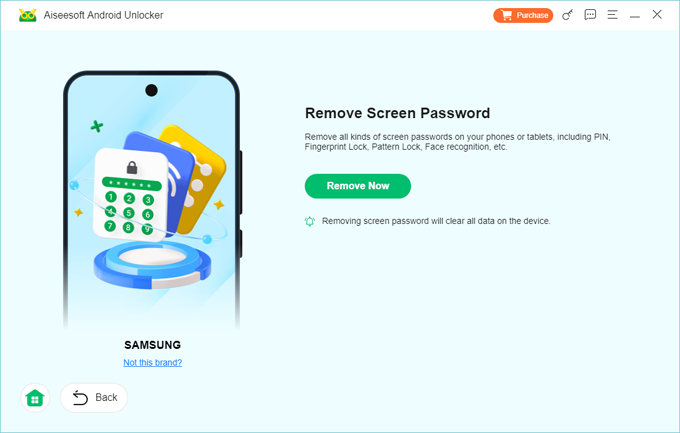
Samsung Galaxy phone should start over and unlock at high success rate after forgetting the original PIN, pattern or password you even used. Whether or not your device is connected to network, or you know the Samsung credentials for the SmartThings Find free unlock, Appgeeker Android Unlocker software bypasses any requirements to have the phone unlocked.
If—after resetting Samsung to its factory settings in a method outside Settings app like through recovery mode—you're stuck at the "Verify your account" screen asking for the previously synced Google or Samsung account, it means the device protects itself by triggering Android FRP (Factory Reset Protection). Only the rightful user with the correct Google or Samsung credentials can get access the phone.
You will be wondering if there's any free Samsung unlocker approach available to unlock the FRP locks when you:
To unlock an FRP-locked device, you can either try to recover the original Google account for free using Google Account Recovery portal, or go through a direct FRP bypass process using a reliable FRP unlock tool - each method can help unlocking the Samsung phone to enjoy all services.
The process will require some forms of authentication to recover the Google account in case you don't remember the password for Samsung device unlock free of charge.
1- Visit Google Account Recovery website on a computer or another phone.
2- Enter the email address of the associated Google account and click Next button.
3- When asked to enter the password, click Try another way option instead.
4- Verify your identity via a recovery email or phone number.
5- Once verified that the account belongs to you, you'll be taken to reset your Google password.
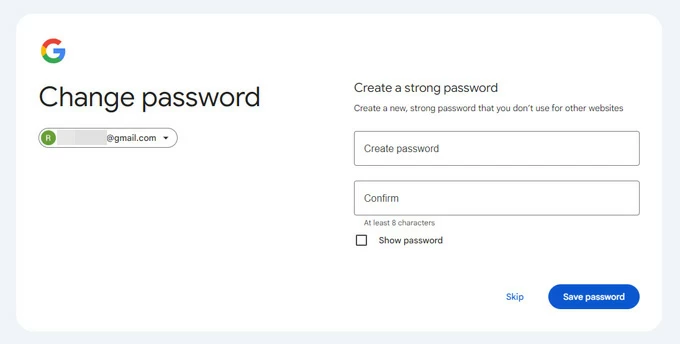
Once you've recovered the Google account by setting up a new password, make sure to wait 24-72 hours for the server to update the login details on all devices. After the period, you can sign into the account to bypass Google verification after reset and unlock Samsung system instantly without paying any fee.
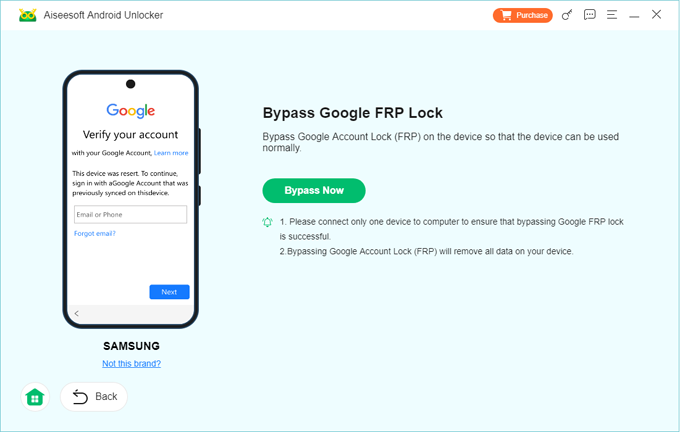
While many free Samsung phone unlock tools (e.g. Easy Samsung FRP Tool) claim to get past the FRP on Samsung phone, they sometimes will not work as expected. To our tests in terms of the ease of use, FRP removal speed, and compatibility, Appgeeker Android Unlocker takes the first place when it comes to unlocking a Samsung phone that's Google locked. It features with a "Bypass Google FRP Lock" toolkit that lets you remove the Google account even without knowing the username & password instantly.
The process is pretty painless: Open the application, choose Bypass Google FRP Lock mode. Then, connect the Samsung phone to the computer, select device brand, and hit Bypass Now button.
When done, the phone will reboot, completely skipping the Google sign-in.
Is your phone "locked to Verizon", "locked to T-Mobile" or "locked to AT&T"? Whether you purchased a second-hand Galaxy phone tied to an unfamiliar network, or you decide to give away your old Samsung phone, a network-locked device prevents you from using a SIM card from a different provider; and if you insert a different SIM card, and you'll see messages like:
No worries—there are two primary methods to unlock Samsung phone for free to any network. One is requesting an official unlock from your carrier with the network unlock code - which is always free, and another is employing a Samsung network unlock service or tool.
Contacting your current carrier is the simplest way to get your Samsung phone unlocked – and it will be entirely free after you've fully paid for the device and your carrier account is in good standing.
This can often be handled by service provider remotely, skipping a trip to the store. In some cases, you need to submit an unlock request for a SIM-locked Samsung device, and the company will send you a network unlock code (NUC) for Samsung or ask you to unlock your phone over the air via its official service app.
Steps to carrier-unlock your Samsung phone for free:
1. Locate your phone's unique IMEI number by dialing *#06# on your phone's keypad, or navigate to Settings > About phone. Write down this 15-digit code.
2. Contact your carrier's customer service department via phone or their online account portal:
3. Once approved, insert a SIM card from a different network into your Samsung phone.
4. When prompted on-screen with SIM Network Unlock PIN, type in the unlock code provided by your carrier and tap Unlock.
By law (including FCC regulations in the US and similar mandates across Canada, the UK, and Europe), wireless networks are required to unlock eligible devices for free upon request.
If you don't meet the carrier's requirements (e.g., you're still on a payment plan but moving overseas), you can use an official or third-party network unlocking service like Galaxy Device Unlock App, CellUnlocker.net, which generates unlock codes based on the IMEI number of your Samsung phone.
The steps on how to unlock Samsung Galaxy with network locked are similar using the 3rd-party network unlock tools. Once unlocked, the phone works with any compatible carrier worldwide.
Older or carrier-branded Samsung Galaxy models (particularly those configured for T-Mobile or Metro by T-Mobile) do not use typed unlock codes. Instead, they use a pre-installed system utility called the Device Unlock app to communicate directly with carrier authorization servers.
1. Ensure your Samsung phone is connected to a stable Wi-Fi network.
2. Navigate to Settings > Connections > More connection settings.
3. Tap Network unlock (or locate the standalone Device Unlock app in your app drawer).
4. Select Permanent Unlock.
5. Wait a few moments while the app checks your IMEI against the carrier database. Once approved, reboot your device to apply the network changes.