How to transfer photos from iPad to Mac


Need to set up your iPhone but it doesn't let you get past the setup screen asking for the MDM information? Here's how to remove MDM profile from an iPhone to get full control.

iPhone managed by MDM usually have the profile installed at Settings > General > VPN & Device Management. If you're unable to remove the MDM from there or contact the IT department that has MDM installed previously, you can use Appgeeker iPhone Unlocker to get help when you are stuck. It's easy to get started and help you bypass MDM on iPhone with ease.
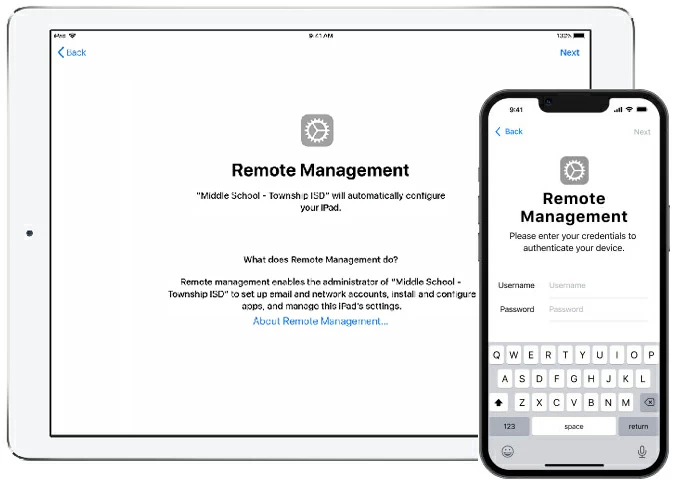
Chances are you purchased a second-hand iPhone from eBay or Amazon, or inherited a managed iPhone from your previous company. The problem is, if there's a Remote Management screen asking you for username & password while restoring the iPhone, that indicates MDM is enabled. Without the login credentials for Remote Management, you're not going to bypass MDM control and get back into your iPhone.
You could just contact previous owners/ organizations who have remote management installed to remove MDM profile from your iPhone, or go to Settings on the device and delete the MDM management profiles on your own if you can.
But yes, there're iPhone MDM removal tools out there available to work. Read on, if you can't remove MDM from iPhone. This article is also applies for removing iPad MDM.
Table of Contents
iPhone MDM, or iPhone mobile device management, is a system that can remotely manage both user-owned and organization-owned iPhones. MDM can be used to control devices, configure settings, install and update software, deploy apps, monitor compliance, and more.
How does MDM work on iPhone
If you see an MDM screen on your iPhone, the device is still managed by the company that is listed on that screen. There is no workaround to bypass remote management without knowing the username and password. Anytime after the factory reset the remote management profile is pushed to that device.
Also: How to factory reset locked iPhone
Before removing MDM on an iPhone, please be mindful that Apple does not turn off MDM on devices even if you take it to a local Apple Store.
If you have a remotely managed iPhone, contact the administrator that installed the MDM to remove it and release the iPhone from MDM server, or follow these steps:
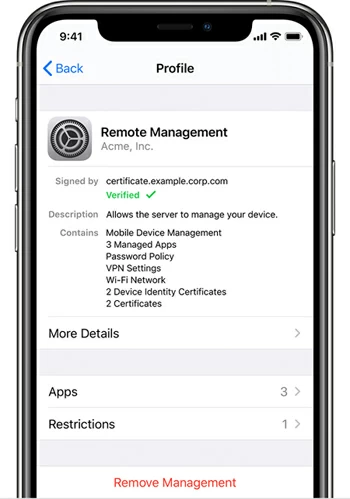
This works because MDM provider creates a management profile of MDM by which the iPhone is remotely managed.
Also: How to transfer photos from iPhone to laptop
If, unfortunately, the MDM profile could not be found on your phone to delete, or the company who installed the management profile could be contacted, then check out the tried-and-true tools of MDM removals.
Appgeeker iPhone Unlocker has been around for years and is labeled as a "suite of tools to unlock different of screen locks for iPhones and iPads." One of great tools is the ability to bypass MDM from iPhone without password when you're stuck on a Remote Management login screen. But you will also enjoy the ability to wipe lock screen passcode, remove Apple ID, reset Screen Time passcode, and other tasks. All the functionality is quite straightforward to understand and put to use.
To remove MDM from iPhone, you need to have the application installed on your either PC or Mac. And you have to have a lot of patience: it will detect your phone model and download a proper firmware package to reinstall the iOS software. It could take a while.
Ready to go? Here's how to remove MDM from iPhone without password in 5 steps.
Step 1. Launch iPhone Unlocker
Open iPhone Unlocker on your computer. You will get a very clean interface, making it simple to navigate and get straight to work without unnecessary distractions.
Select "Remove MDM" to proceed.
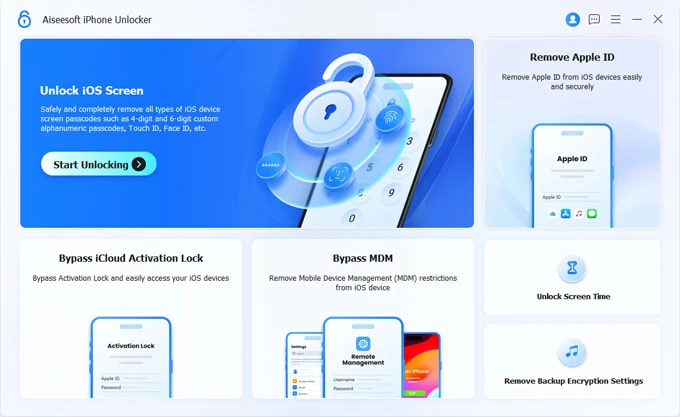
Tip: you will want to choose "Wipe Passcode" if you need to fix an unavailable iPad.
Step 2. Connect your phone
Next, plug your iPhone you want to bypass MDM lock into your computer via a cable.
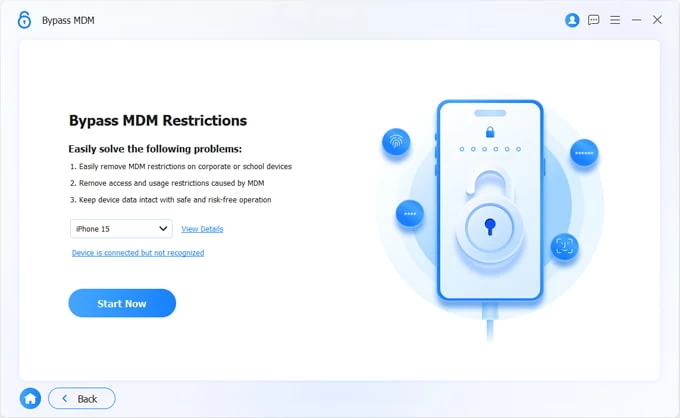
Step 3. Configure your iPhone
In this stage, you will need to disable Find My iPhone and Stolen Device Protection in your phone's Settings. The steps will differ slightly depending on what iOS you phone has. We suggest checking the steps on screen (see below) for exact instructions.
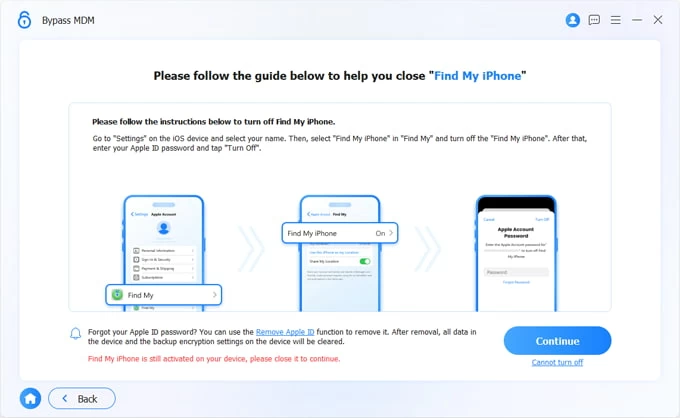
Step 4. Begin bypassing MDM management on iPhone
After you have everything ready, click "Continue" button to let iPhone Unlocker remove the MDM lock from iPhone automatically.
Note, the process will also erase all the data and settings, and reset the device to its factory defaults.
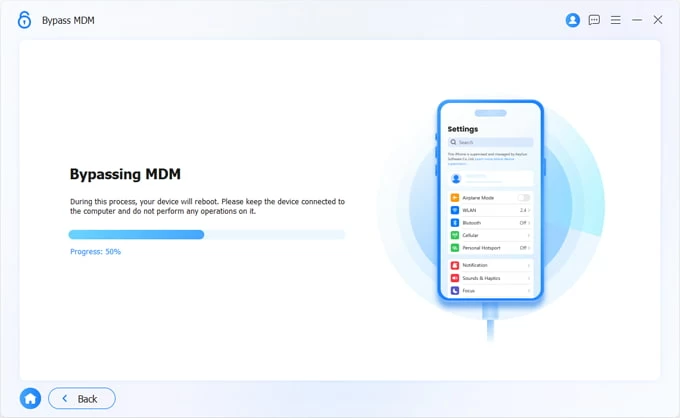
That's all there is to it! During the remaining setup, you will need to use your Apple Account to reactivate your phone when it asks for username and password in Activation Lock screen.
Note:
Just a reminder: only the work or organization that has remote management installed previously can remove MDM from iPhone permanently. iPhone Unlocker will help remove MDM, but temporarily. Avoid resetting your device or flashing the firmware, or it will relock with MDM. But you can still use the software to bypass it once more.
Also: How to reset Samsung Galaxy phone when locked
Q1. How can an iPhone be enrolled in MDM?
You can enroll iPhones in an MDM solution in three ways:
1. Automated Device Enrollment: ABM or ASM, an MDM with an automated enrollment profile
2. User-initiated enrollment: a web enrollment form required
3. User-driven enrollment: requires ABM or ASM with Managed Apple IDs setup and an MDM
ABM, aka Apple Business Manager; ASM, aka Apple School Manager
Q2. How can I find remote management username and password for my iPhone?
You can't. Remote management can only be moved by the company that has MDM installed. You will need to ask the company to provide you with the username and password, or let they remove the MDM profile off iPhone.
Q3. Do I get rid of the MDM on my iPhone free?
You may try going to Settings > General > VPN & Device Management to delete MDM profile from your iPhone. If it doesn't work, go with Appgeeker iPhone Unlocker, a dedicated MDM removal tool for iPhones and iPads.
Q4. Does restoring iPhone remove MDM profile?
No. The Remote Management remains active on an iPhone even after a factory reset; it requires the original owner or organization's username and password to bypass.