Recover Deleted iPhone WhatsApp without Backup


Looking for the best WhatsApp transfer software? Compare top solutions to quickly migrate WhatsApp chats between iOS and Android, iOS and iOS and Android and Android.

WhatsApp transfer is essential for users to switch phones from iPhone to Android or Android to iPhone, or upgrade within the same ecosystem. However, transferring WhatsApp chat history between devices especially across platforms can be challenging due to different operating systems, incompatible backup formats, and limited official WhatsApp migration solutions.
Don't worry—your years' worth of WhatsApp data doesn't have to be trapped on the old phone—until you know how to select the proper WhatsApp transfer software.
In this guide, we'll explore the best WhatsApp transfer tools, compare the features, explain which program works best for your certain transitions, and help you choose the safest and most effective way to move your WhatsApp messages, photos, videos, account info, documents, etc. in one go. The right WhatsApp migrators can make transferring WhatsApp to another device or platform stress-free.

Check out our list of WhatsApp migration products to bring all your WhatsApp chats over from one phone to another smoothly.
Thanks to its balance of usability and advanced capability, Appgeeker WhatsApp Transfer ranks among the top WhatsApp chat migration tools, helping you effortlessly move all WhatsApp data between devices and platforms (iOS, Android) after setup while preserving data integrity at every stage of the data migration process. No reset, no data loss.
Table of Contents
WhatsApp data transfer is a process of migrating your entire WhatsApp account—including chat history, photos, videos, voice notes, attachments, profiles, and settings—from an old phone to a new one. It is often part of smartphone switch or upgrade.
Whether moving to and from iPhone or Android phone, between iPhones, or between Android phones, a secure, cost-efficient, and practical approach is essential to successfully ensure the WhatsApp's full chat history and media files reach its new destination.
While you might expect WhatsApp transferring process happens automatically by simply logging into your account on a new phone, WhatsApp messages are end-to-end encrypted and stored locally on your device rather than on its central server. Without a transfer of WhatsApp, you would start with a completely empty chat list on your new phone.
Many WhatsApp transfer utilities are designed to streamline chat data swapping across different phones and ecosystems, ensuring migration projects' accuracy, efficiency, and overall success.
When choosing WhatsApp message transfer tool, there are often two options to consider, which depend on the transition direction, platform support, data integrity, device compatibility and speed & stability.
Official WhatsApp transfer programs
These are built directly into WhatsApp or the phone's operating system, including WhatsApp QR Code Transfer, Move to iOS app, Google Switch to Android app, Samsung Smart Switch.
3rd-party WhatsApp transfer programs
These are paid programs usually for PC or Mac that offer more power and flexibility to copy everything in WhatsApp from one phone to another. Popular products include Appgeeker WhatsApp Transfer, Wondershare MobileTrans, FonePaw, and WazzapMigrator (iPhone to Android only).
Before we dive into the top WhatsApp migration software tools, it's important to understand what actually matters in a smoother move for WhatsApp between two handsets.
Also: How to transfer WhatsApp from Android to iPhone without factory reset
Below are 8 best WhatsApp transfer software applications you can opt for completing phone switching process. However, that doesn't mean that each of them will be the right tool for you to ease the process of copying the chat history on WhatsApp to new phone or already set-up device; that's why we discuss each of them in more details to help you make your decision.
Appgeeker WhatsApp Transfer is one of the most popular and well-established third-party WhatsApp messages migration tools, trusted by millions of beginners and advanced users for its unmatched simplicity. It's a comprehensive software suite that will do everything from transferring WhatsApp chats and media to backing up WhatsApp data to computer without Google Drive or iCloud.
The tool supports cross-platform transfers, facilitating seamless & complete transfer of WhatsApp across different ecosystem on nearly all iOS and Android devices. With a few clicks, you can move your messages, media, and settings to another device altogether - none of your previous WhatsApp data will be left behind your previous phone.
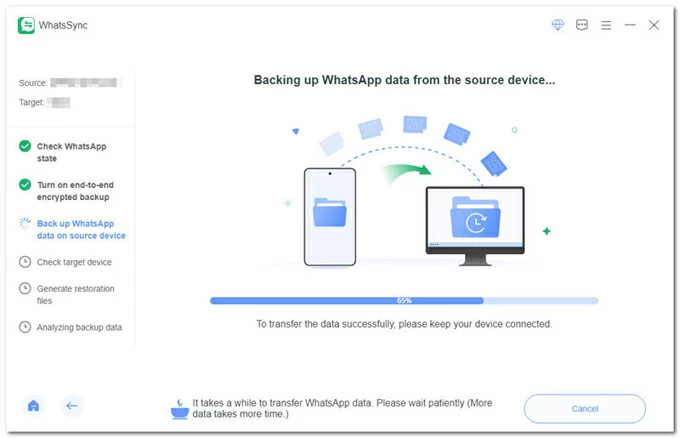
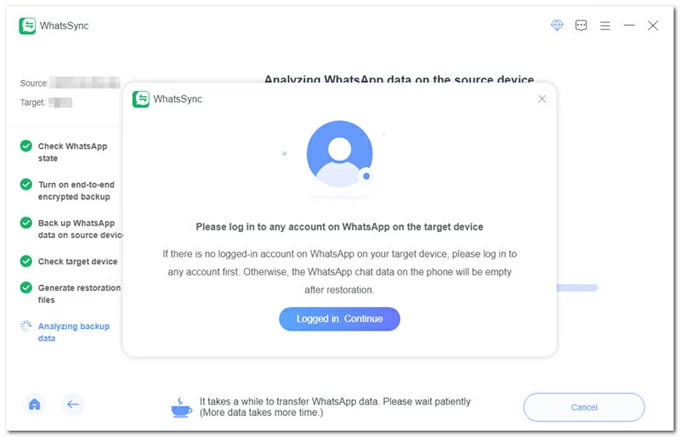
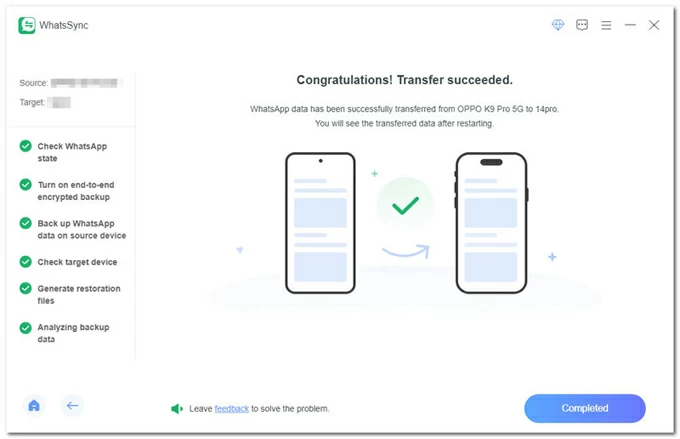
Ready to make the move? Here is how you can use this WhatsApp chat migrator, for example, to transfer WhatsApp from Android to iPhone after setup without data loss. For users who switching from iOS to Android, from iOS to iOS, or from Android to Android, you can check our complete WhatsApp migration guide.
Step 1. Download WhatsApp Transfer PC-based tool on a working computer, and install it properly.
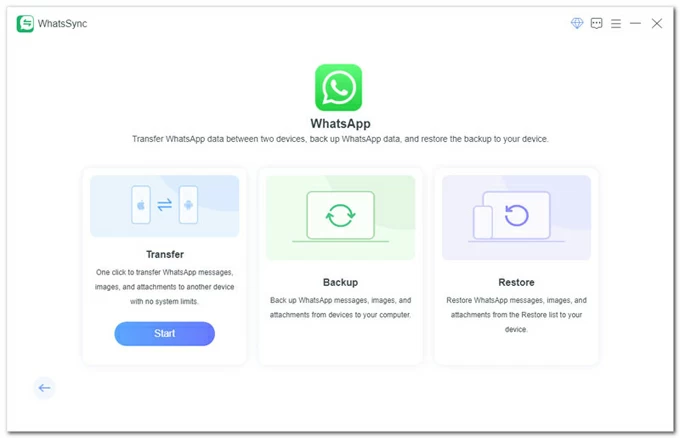
Step 2. Launch the software. On its main interface, go to WhatsApp module and click Start button.
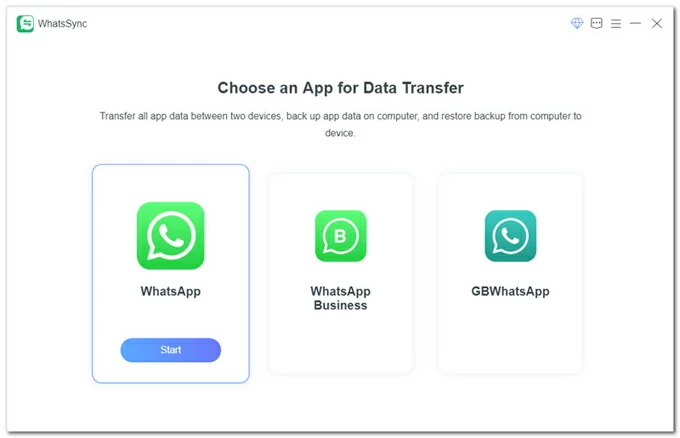
Step 3. To export WhatsApp chat, choose Transfer mode and press Start button that appears.
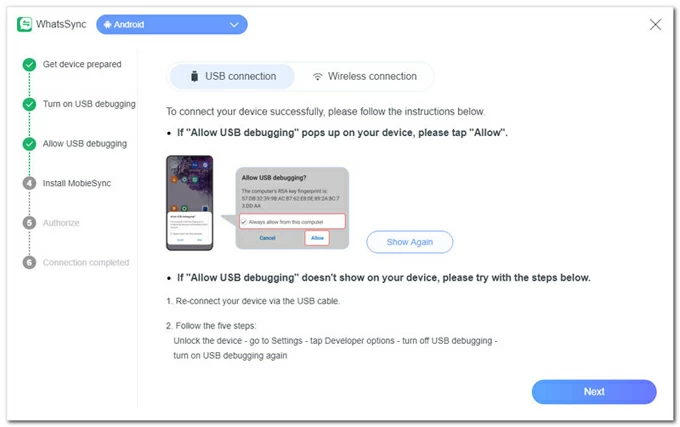
Step 4. Connect both your source Android phone and your target iPhone to the computer using two cables.
On iPhone, tap "Trust" when prompted, and keep it unlocked during the whole migration process.
On Android phone, follow the onscreen instructions to enable USB debugging mode, install MobieSync app, and authorize your permission for full access.
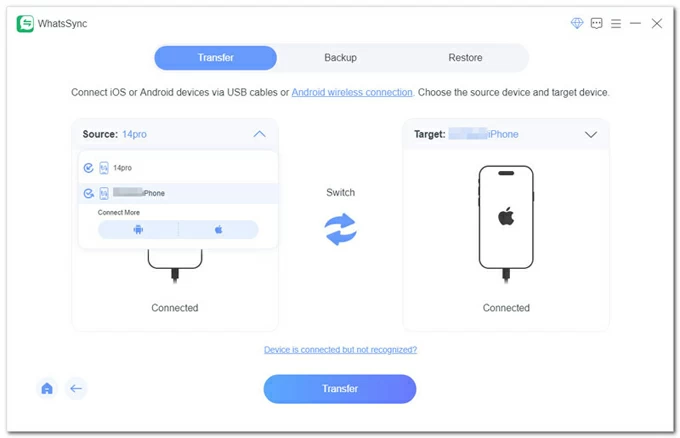
Step 5. Once both devices are recognized, click on Transfer button.
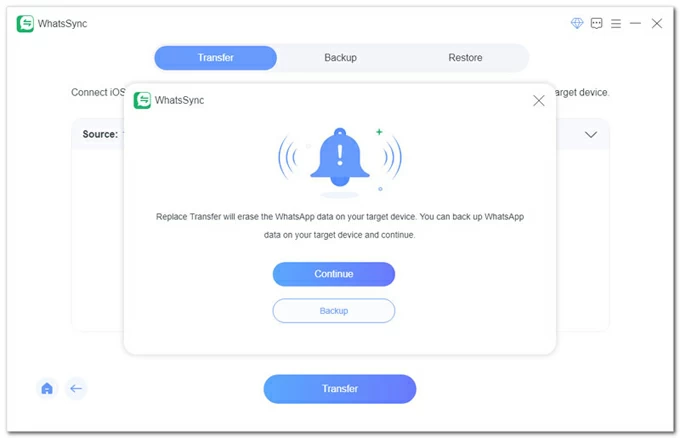
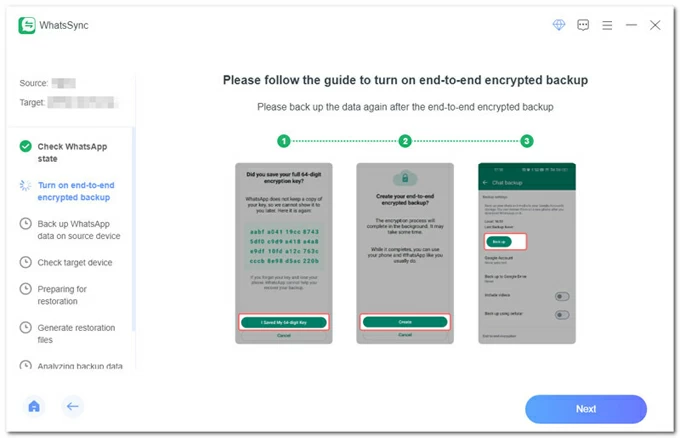
When prompted, click Backup button to ensure a no-loss WhatsApp data transfer after setting up your new iPhone. This is what the native Move to iOS app can't do.
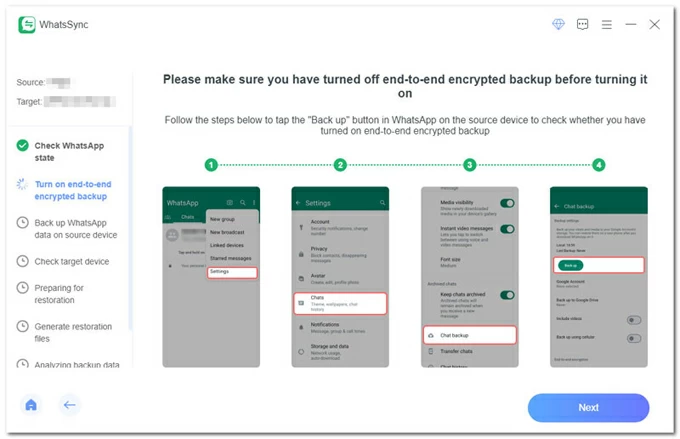
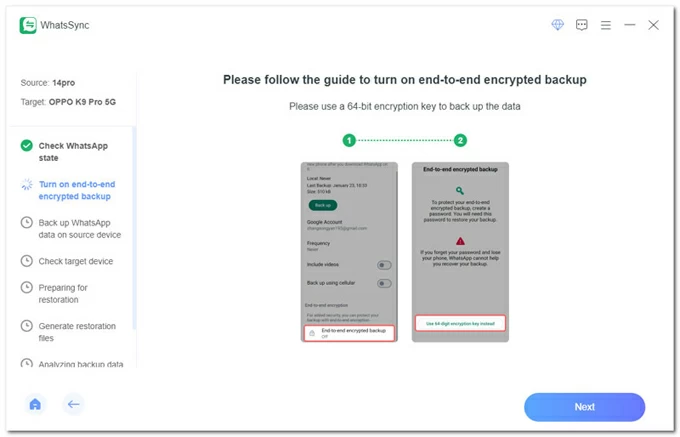
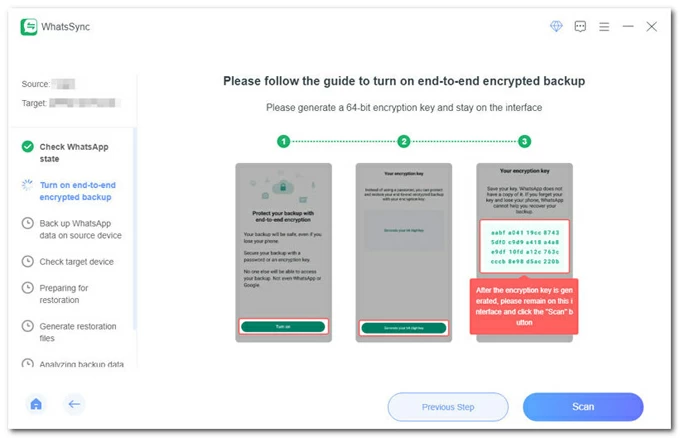
To transfer your WhatsApp from Android to iOS successfully, you need to follow the onscreen wizard to configure your phones properly:
On your iPhone, turn off Find My iPhone.
On Android,
Pros:
Cons:
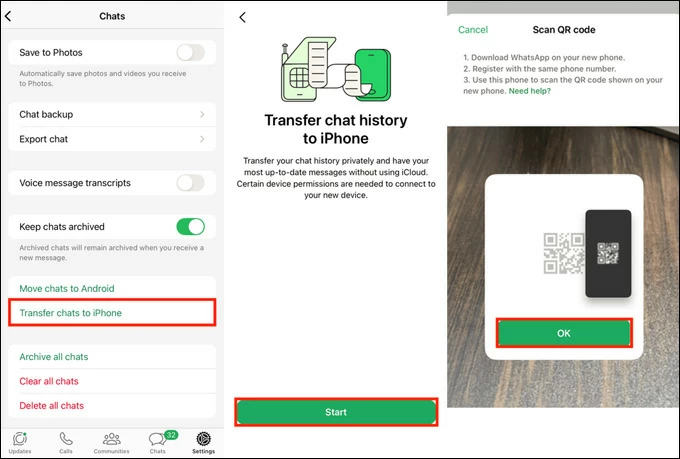
WhatsApp's in-app Chat Transfer tool is a feature designed to let you migrate your entire chat history, including media and documents, directly from an old phone to a new one without needing a Google Drive or iCloud backup that has storage limits. It has become the standard for users switching within the same operating system (Android to Android or iOS to iOS) and has seen refinements in speed and security.
The official free WhatsApp transferring technique uses a local Wi-Fi connection and QR code pairing to move data between devices, including individual & group conversations, attached photos, videos, animated GIFs, account information, settings. It lacks support for the migration of call history, peer-to-peer payment messages or media received over WhatsApp Channels.
Pros:
Cons:
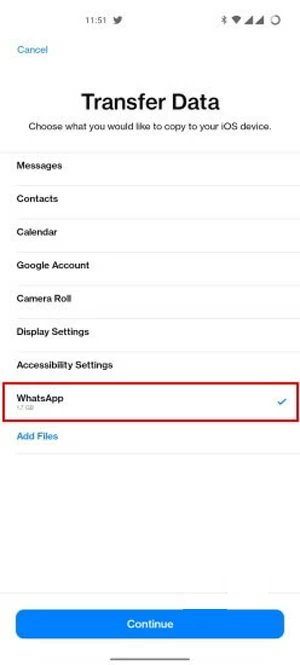
If you're moving from Android to Apple, the Move to iOS app remain the best starting point to migrate your data including WhatsApp - though it requires patience. It's the Apple-developed Android-to-iPhone transfer tool that only works during the initial setup of a new iPhone. If you your iOS device is already in use, you have to erase the iPhone completely to take your WhatsApp chats and other content over.
It simplifies the wireless data transfer process by building a temporary Wi-Fi connection between your Android phone and iPhone, eliminating the need for cables or a computer. The good news is that wired transfers has been notably supported. This addresses long-standing complaints about speed and reliability via wireless transfers.
For transferring Android WhatsApp to a new iPhone, the content including account info, personal chats, group chats, media files, communities, WhatsApp Channels updates, and settings will be moved over. However, Move to iOS app does not transfer call history, display names, or media received via Channels.
Pros:
Cons:
If you're looking for a tool for transferring WhatsApp data from iPhone to Android, then Google's Switch to Android app is your option.
Switch to Android is a setup integrated data migration app that help copying data from an iPhone to a brand new Android device through wired or wireless option. It's designed to make the cross-platform transition smoother but has limitations in case your Android phone is not brand new or factory-reset. There's no official way to merge chats after WhatsApp has been set up on Android — you must wipe and retry.
The application includes an iOS-to-Android WhatsApp transfer solution using USB-C to Lightning/USB-C cable and QR Code scan during the device setup, in an attempt to preserve your WhatsApp chats, media library, voice messages, account data, WhatsApp Channels updates, communities, and more as you switch systems.
Pros:
Cons:
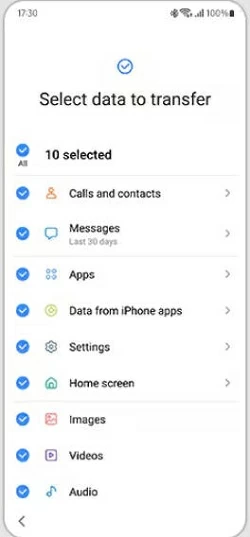
Smart Switch software for WhatsApp migration runs on a Samsung phone that's in its initial "Out of the Box" setup state in an effort to move over WhatsApp messages, and other more data from your old phone (iPhone or Android) to a new Samsung Galaxy phone using the same phone number. It aims to migrate contacts, media, messages, apps, and — importantly here — WhatsApp data when switching from an iPhone or Android mobile phone.
Pros:
Cons:
Related: How to import WhatsApp from iPhone to Samsung
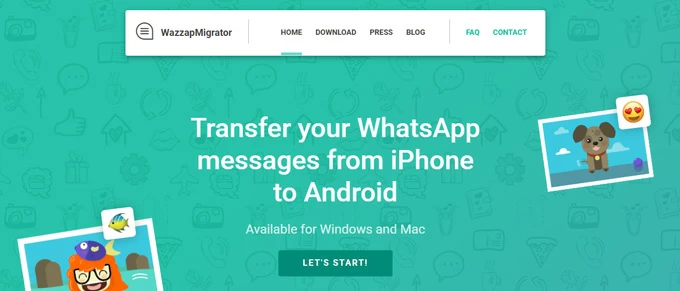
WazzapMigrator is a niche third-party WhatsApp transfer tool for Windows and Mac designed mainly for iOS to Android migration, along with the WhatsApp chats, media, and attachments copied over.
Unlike official WhatsApp tools that require a factory reset, WazzapMigrator is a technical solution that works by extracting your database from an iTunes/ Finder backup and putting it into the Android WhatsApp database. This also means that if you lost or sold your iPhone but still have an iTunes backup on your computer, WazzapMigrator can still perform the transfer.
In short, WazzapMigrator is effective but less user-friendly compared to alternatives because the full migration process (extracting the backup, conversion, and restoring) can take a long time with large chat histories.
Pros:
Cons:
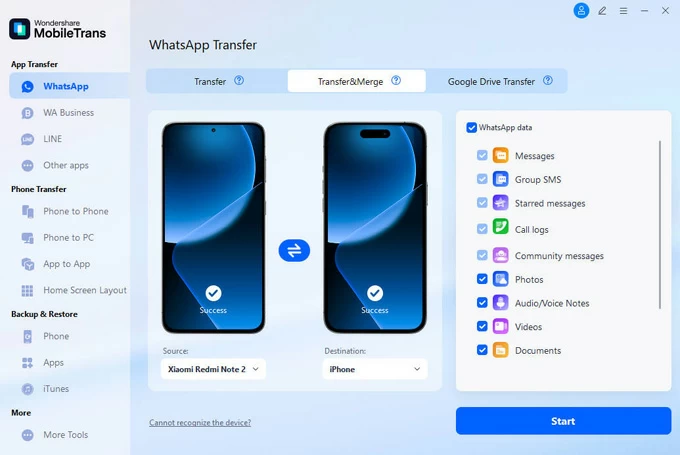
MobileTrans by Wondershare is another WhatsApp transfer tool available for Windows and Mac computers on the market so you don't worry about losing your WhatsApp data after buying a new phone. It facilitates the process of copying your chats and media library from old to a new phone, regardless of Android OS or iOS phones.
Similar to Appgeeker WhatsApp Transfer software, MobileTrans is able to bypass the need to factory reset the target device that has been set up and quickly move nearly everything inside WhatsApp straight from the source device - even both devices are using the different phone number. No loss of chats or data.
Pros:
Cons:
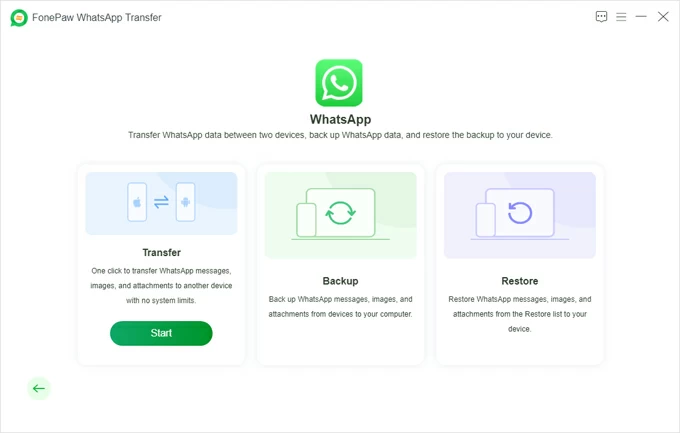
FonePaw is a solid alternative to WhatsApp's built-in chat transfer application that focuses on stability. It's effective in transferring WhatsApp data between same or different mobile platforms more conveniently, quickly, and without data loss. It uses the local, encrypted cable transfer technique to make the process secure and keep the chats intact on both two devices.
Another feature called Backup and Restore lets users to create a local backup on your PC and restore it to any device later. The software is available on Windows 11, 10, etc.
Pros:
Cons:
WhatsApp transfer software programs save you time and headaches when moving to new smartphone and reduce as much as possible the risk of corruption in the process of exporting WhatsApp data from one phone to another phone.
Whether you prefer the official WhatsApp method, a flexible third-party tool like AppGeeker WhatsApp Transfer for PC, WazzapMigrator, MobileTrans, or FonePaw, or device-specific solutions like Smart Switch, the right choice depends on your device setup and your priorities like cross-OS compatibility, data integrity, ease of use, no-full-reset requirement, or any other.